Unit Codes
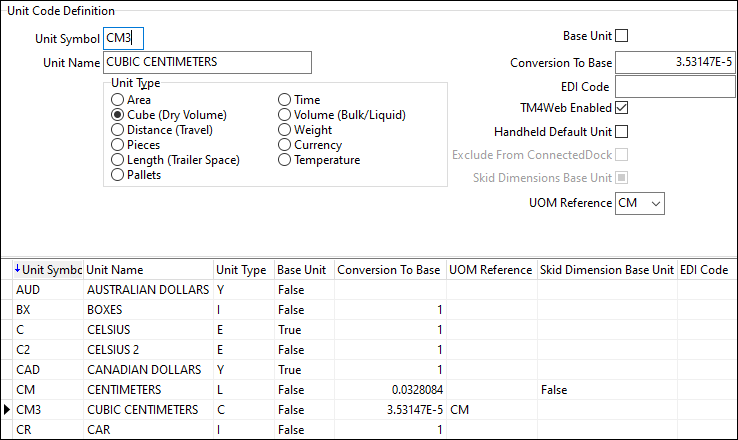
On the Unit Codes tab you can set up and define units of measurement as unit codes.
Create a unit code
-
In Codes Maintenance (Codes.exe), select
 Units.
 -
Select
 Insert. A blank record appears on the grid.
 -
Enter values and select options on the Unit Code Definition pane:
Field/setting name Definition Unit Symbol
Enter a (maximum) 3-digit code that describes this unit.
Unit Name
Enter a description (up to 20 characters) for this unit code. Generally, this description is used for reporting and informational purposes only.
Unit Type
Describes the measurement that this unit code represents. For example, you may have a unit code for kilometers and a unit code for miles, but both are of the type Distance (Travel).
Create unit codes with the Currency type to set up your default currency values.
Base Unit
Select this checkbox if the unit you are configuring is your standard unit for this Unit Type. For example, if you operate in multiple currencies, select this checkbox for your main currency.
Note: With Multi-Company setups, it is possible to define a "base" currency for each individual company. If a Currency value is specified on the Identification tab in the Company Profiles program, it will become that company’s base currency. If, however, a Currency value is not specified there, that company will use the global base currency set by this checkbox.
Conversion to Base
In cases where automatic conversions are performed, the factor stored in this field is applied to the amount to arrive at the equivalent amount in the Base Unit for this Unit Type. For units that are configured as Base Units, the conversion factor should be 1.
Note that the conversion factor is not used for currency conversions because of their fluctuating nature. Instead, currency conversion factors are entered on the Currency tab in the GL Chart of Accounts program.
EDI Code
When using the EDI Audit program, unit codes must be expressed in a standard format. The value in this field is used as the equivalent EDI value for this unit type. Refer to the documentation provided by your EDI partners to determine the value that should be entered in this field.
TM4Web Enabled
Check this option if the unit code being created is able for use in TM4Web.
Handheld Default Unit
Check this option if the unit code being created should be used as the default when using the handheld application.
Exclude from ConnectedDock
Use this option to indicate which unit codes can be used in the ConnectedDock application. The unit types controlled by this feature are:
-
Length (Trailer Space)
-
Pallets
-
Pieces
-
Temperature
-
Weight
The remaining unit types are not used in ConnectedDock, so the Exclude from ConnectedDock checkbox option is grayed out for those unit types.
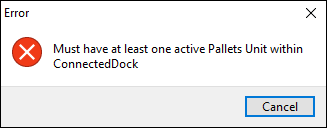
At least one unit code must be made available within ConnectedDock for each unit type. You cannot exclude all unit codes for a particular unit type. For example, you must have at least one unit code for length, one for weight, one for temperature, and so on.
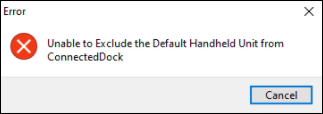
You cannot exclude the unit code if it is the Handheld Default Unit.
Skid Dimensions Base Unit/ UOM Reference
These options specify for each skid:
-
What units of measurement it uses.
-
Whether its dimensions should be converted to the same cube units as the Load Details record it is assigned to.
As an example, here is a record on the Load Details grid that has three pieces and M3 (cubic meters) as its Cube Units value:

-
-
Select
 Post. The unit code is saved.