Monitor on-road events to improve driver safety
(Requires CoPilot 10.27 and higher)
CoPilot navigation offers a wide range of driver safety features—from speed and sudden slowdown alerts to notifications about restricted roads and bad weather. In CoPilot 10.27 and higher, those on-road events are now captured and displayed in the RouteReporter web tool. Fleet managers can review events as part of their post-trip analysis to help improve driver safety in the future.
Contact us to request access to RouteReporter, or reach out directly to your Trimble account manager for more information.
How on-road events are tracked
If you are licensed for RouteReporter, and have devices running CoPilot 10.27 and higher, on-road events are automatically recorded by vehicle or by driver—depending on how your fleet is set up in Account Manager. (Events related to weather and traffic may require additional CoPilot licensing.)
Viewing on-road events
You can view on-road events in RouteReporter by expanding the route card for any route you want to review.
-
If the route had events including warnings for low bridges, restricted roads, rollover risk, speed slowdowns, speeding, or weather notifications, you will see the Safety Alert badge.
-
The route’s total number of events will then be listed next to Events.
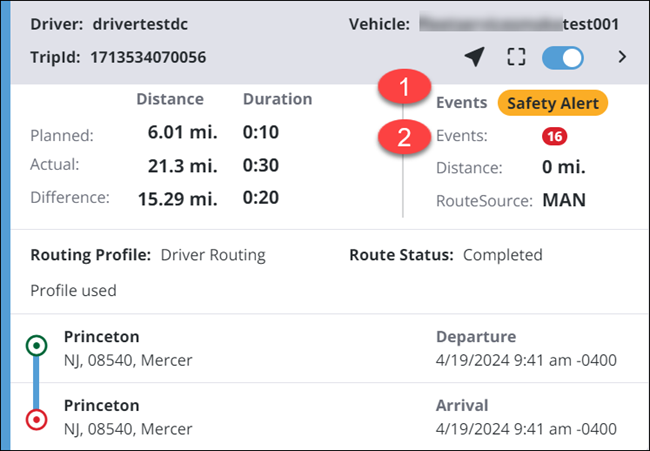
A route card for a route with 16 events.
Select the right arrow at the top of the card to expand the Route Details, including more information about each event.
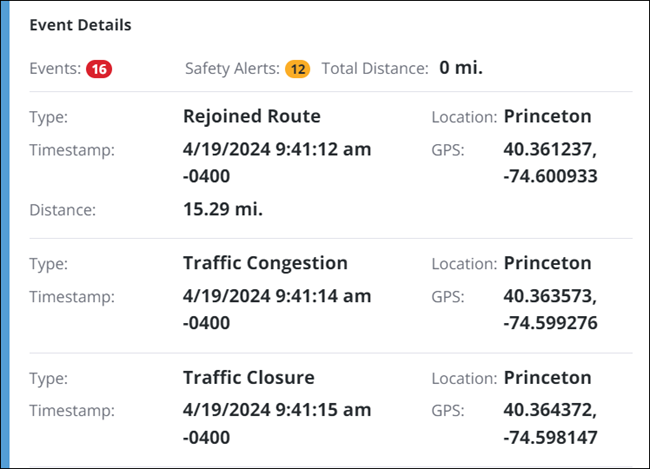
| These are the Event Details for the first three of the 16 events on this trip. The list can be scrolled to view all events. |
Events and details
The chart below describes the safety and on-road events that are tracked by CoPilot and displayed in RouteReporter.
| Map Icon | Event | Description | Additional CoPilot licensing required? |
|---|---|---|---|
|
Speed |
When a driver has exceeded the speed alert threshold in CoPilot. |
No |
|
Rollover Risk |
When a driver travels above the minimum speed limit for a high rollover turn. |
No |
|
Restricted Road |
When a driver drives onto a road their vehicle should not be on. |
No |
|
Idle |
When a driver idles for more than 5 minutes at a location that is not a designated stop. |
No |
|
Low Bridge |
When CoPilot displays a warning about a low bridge that their vehicle cannot clear. |
No |
|
Out-of-Route |
When a driver leaves or rejoins the planned route. |
No |
|
Rejoined Route |
When a driver rejoins the planned route after going off-route. |
No |
|
Weather |
When a weather notification is displayed to the driver during a trip. |
Yes |
|
Sudden Slowdown |
When a driver was warned of a traffic slowdown. |
Yes |
|
Traffic Detour |
When a driver was prompted with an alternate route due to traffic. |
Yes |


