Importing and Exporting Orders
Options for Importing Orders
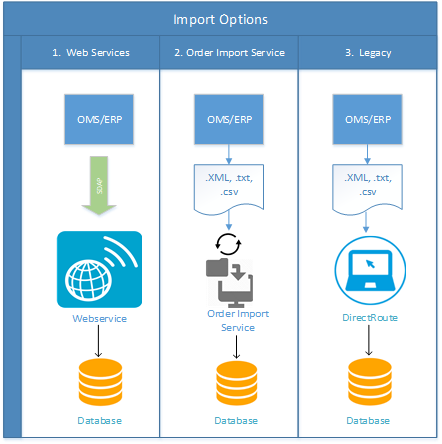
There are a variety of methods of which organizations can use to import orders into DirectRoute™ or DRTrack™. These methods range from simple (passing text files) to more complex (full web service) integrations.
The primary methods used most often to send data to are:
-
Web Services – Automatically push orders from the ERP/WMS/OMM in near real-time, or as a daily (batch) process
-
Order Import Service(OIS) – Batch import orders from a text file (.CSV, .EXT) created by the ERP/WMS/OMS
-
DirectRoute – Import data in a worksheet (.XLS), or ASCII file (.CSV, .EXT) using DirectRoute
Options for Exporting Route Info
After a routing solution has been completed, the resulting route info and statistics can be exported from the database to an ERP/WMS/OMS. This article describes the different methods customers can use to export that information.
Options for Exporting Routes
The primary methods used to retrieve and export data from DirectRoute and/or DRTrack are:
-
Web Services Retrieval: Automatic extract of route and account info in near real-time, or in a daily batch process.
-
File Export (Database): XML file export with route and account detail for consumption by an ERP/WMS/OMS.
-
File Export (DirectRoute): UPL/CSV/TXT/XML file export with route and account detail for consumption by an ERP/WMS/OMS.
DirectRoute (Legacy) File Import
The file import from DirectRoute allows import from Tab Delimited (.CSV, .TXT or .XLS) files.
Benefits of this import type include:
-
Simple (.TXT or .XLS) file format
-
Typically used for routing only deployments with a 3rd party dispatch/execution system
The order file generated from an ERP/WMS/OMS can contain as much or as little information as the system is able to generate. Any information missing from the order record will be populated from the Account Master record. Orders for new accounts will automatically create a new Account Master record.
At a minimum, the order file should include:
-
Account Number
-
Ship To
-
Order number
-
Order volume (weight)
-
Special instructions
-
Delivery address
The Account Master can reside locally in a file or can be stored in the database.