Trimble Identity (TID) — Customer Overview
What is Trimble Identity?
Trimble Identity (TID) is a centralized, enterprise-grade authentication service that provides secure access to all Trimble applications and services. Built on industry-standard protocols, including OAuth 2.0 & OpenID Connect, TID ensures your users can access Trimble’s suite of products with enhanced security and a seamless experience.
With TID, a single user identity is maintained across all Trimble platforms and applications, eliminating the need for multiple usernames and passwords.
What Problems Does TID Solve?
-
Multiple Login Credentials — Users no longer need to remember separate credentials for different Trimble applications. One identity works across all platforms. Users can move between Trimble applications like DRTrack, Appian Daily Planner, Appian Resource Calendar, Customer Communication Manager, and Account Manager without repeated login prompts.
-
Enhanced Security — TID provides enterprise-grade security with multifactor authentication (MFA) support, reducing the risk of unauthorized access.
-
Standardized Authentication — By using industry-standard protocols, TID ensures compatibility and security best practices across all integrated applications.
Benefits to Customers
-
Improved User Experience — Single sign-on (SSO) capability means users log in once and gain access to all authorized Trimble applications, saving time and reducing frustration.
-
Increased Security — Multi-factor authentication enforcement and centralized identity management protect your organization’s data and reduce security vulnerabilities.
-
Reduced IT Overhead — Centralized user management simplifies administrative tasks such as user provisioning, password resets, and access control.
-
Future*Proof Infrastructure — TID is built on modern standards and will continue to support new Trimble applications and features as they are released.
-
Compliance Ready — TID helps organizations meet security and compliance requirements with robust authentication mechanisms and audit capabilities.
What Customers Need to Do
To ensure a smooth transition to TID and to maximize its benefits, read through the bullets below and then complete the following steps.
Email Addresses
-
Valid Email Required — Each user must have a valid, accessible email address associated with their account. TID uses email for account verification, password resets, and important security notifications.
-
Update Contact Information — Ensure all user email addresses in your system are current and accurate before the TID migration begins.
-
All current Appian logins (DRT, ARC, ADP) will require an email address to be populated in User Management to correctly match with the TID once set up.
-
Email addresses must match in both places — TID and the application
-
The Appian user account email field needs to be set to match your regular email address. That email address is normally setup in the Identity Provider by the company IT department.
-
The company Identity provider (e.g. Azure / Okta) login is not always the user’s regular email address.
-
Multi-Factor Authentication (MFA)
-
Enable MFA — Organizations are strongly encouraged to enable multi-factor authentication for all users to enhance security.
-
User Preparation — Users should be prepared to set up MFA using their preferred method (authenticator app, SMS, etc.) during the TID registration process.
Non-Federated Standard Users
-
These are standard Appian users with any SSO provider currently. These users access the Appian landing pages (DRT, ADP, ARC) and login.
-
Follow the steps below for Non-Federate Standard Users
Federated Users (SAML)
-
Identity Provider Coordination — Organizations currently using SAML-based federated authentication need to coordinate with their IT teams to configure TID as the new authentication provider.
-
Testing — Federated authentication configurations should be tested in a non-production environment before rolling out to all users.
Administrator Preparation
-
Review User Lists — Administrators should review current user accounts and remove any inactive or obsolete accounts before migration.
-
Communication Plan — Develop a communication plan to inform users about the TID transition, including timelines, instructions, and support resources.
-
Training — Ensure administrators are familiar with TID user management capabilities and processes.
Timeline Awareness
-
Gradual Migration Period — The transition to TID will occur gradually. During this period, both legacy Appian authentication and TID will work side by side.
-
Mandatory Cutover Date — After the agreed upon date, legacy Appian authentication will be disabled. All users must have completed their TID registration by this date.
-
For additional support or questions about TID implementation, please contact [email protected] or raise a service request
User Registration and Migration
-
Register for TID — Existing users need to register for a TID account:
-
Click the Login with TID button on the application
-
Click on the Create a Trimble ID link
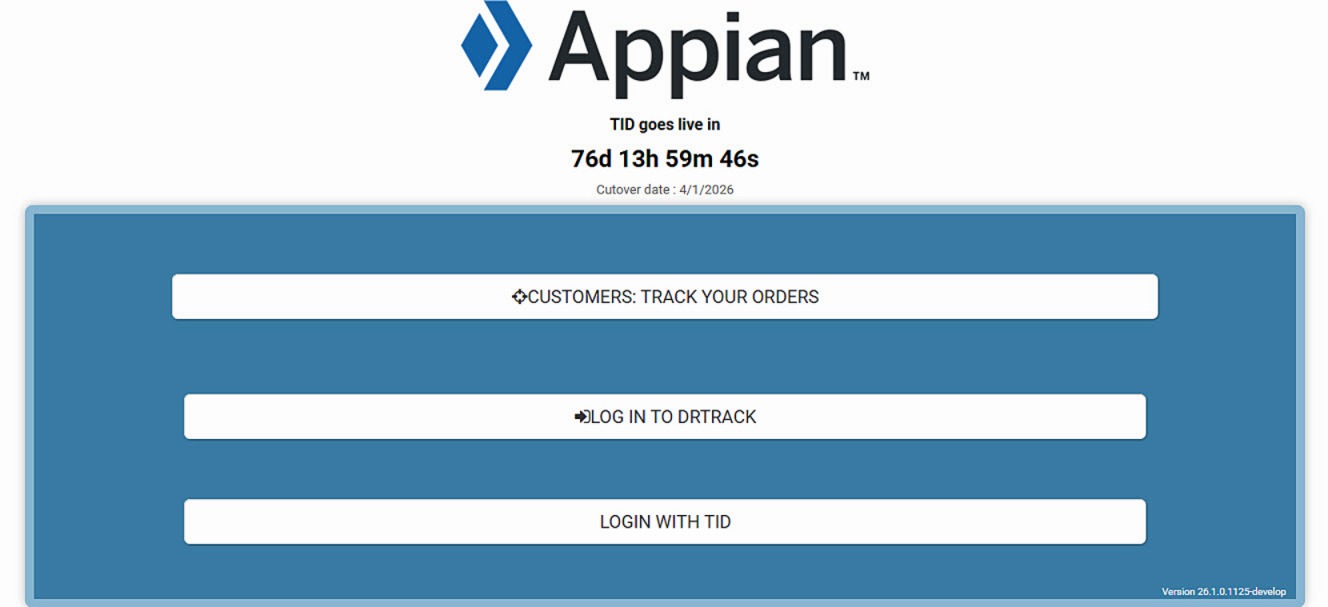 Figure 1. TrimbleID Login
-
-
Bulk user editing — Use if multiple users need to be added at one time.
-
If an automated import is needed, the UserSync REST API can be used.
-
Click on Admin then User Manager
-
Select Import/Export users
 Figure 2. Import - Export Option
 -
Export users then fill in the unique email field for each
-
Import users to upload those users and emails
-
-
-
Link Existing Accounts
-
The system matches the email, entered in TID, with the Appian user email, and automatically links their existing Appian/DRTrack account with their new TID identity
-
Click on Login with TID to complete this process through the application interface
-
-
Complete Migration by Deadline
-
A countdown feature is added with the 25.4 release to remind customers of the cutover deadline
-
All users must complete their TID registration before this deadline to maintain access
-
The legacy Appian authentication will be disabled after this date
image
-
Resources
Related Documents
-
[DirectRoute User Guide]
-
[Appian Daily Planner User Guide]
-
[Appian Resource Calendar User Guide]
Support
Email: [email protected]
Online service requests
US (toll-free): 1-800-663-0626
Monday-Friday, 7am-5pm CST