Live GPS
| Requires CoPilot 10.28.2.237 or later. |
RouteReporter’s Live GPS feature provides real-time insights into driver activity, eliminating the need to wait for post-trip data. In Progress trips can be monitored live, allowing dispatchers to see current vehicle locations and route events as they happen.
How it works
CoPilot sends periodic GPS pings to RouteReporter while a trip is in progress. (By default, these pings are sent roughly every minute, and batched and sent to RouteReporter about every five minutes.) Additionally, CoPilot triggers immediate pings on key events such as Left Route alerts.
RouteReporter displays these GPS pings on the map as they are received, alongside the complete route path. When the trip is finished, full analytics and summary data are also available.
View Live GPS data
-
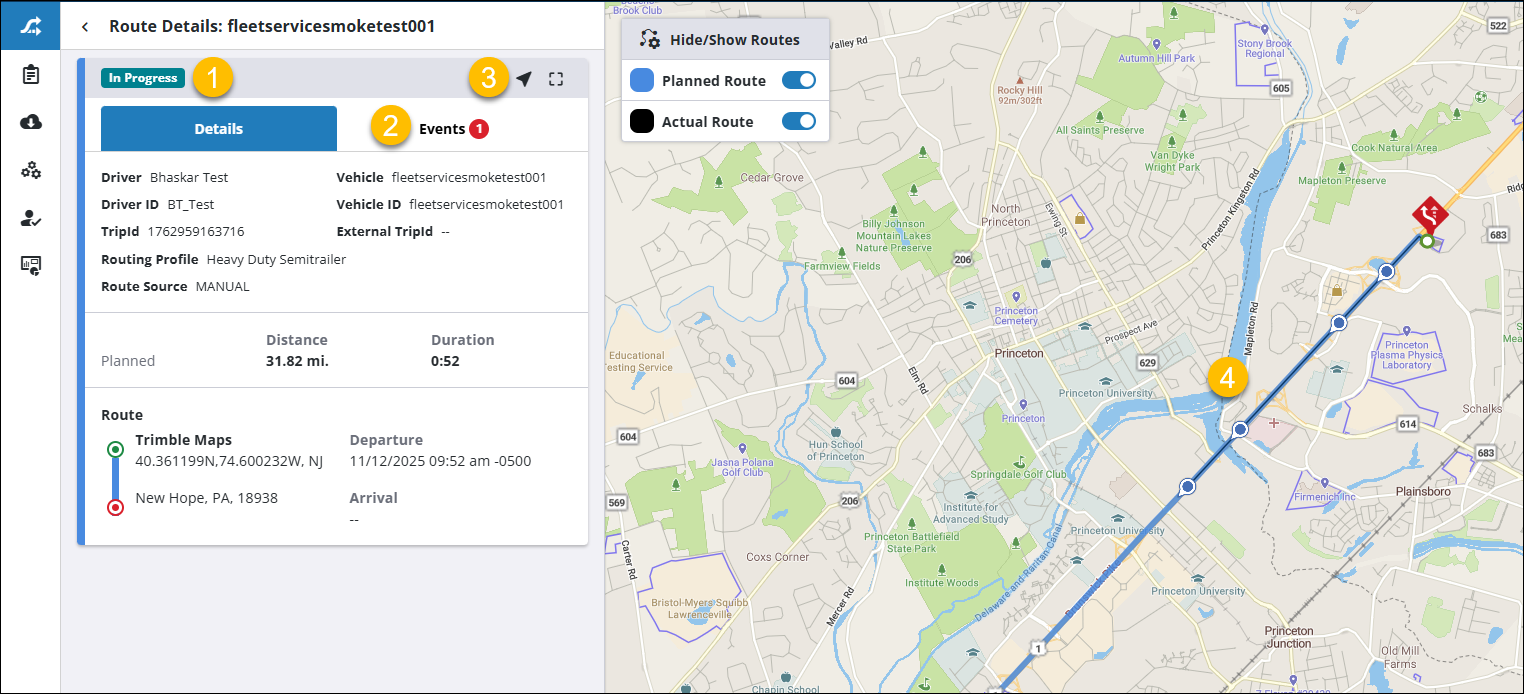
In the Route Compliance tab, filter your vehicles or drivers for today’s date, and select an In Progress trip.
-
Select the Details tab to view trip details or the Events tab to view route events, if any. (A numbered red badge will indicate if any route events have occurred so far.)
-
Select the GPS Pings (arrow) icon to view the live GPS pings on the map.
-
As the trip progresses, new GPS pings will appear on the map in real-time. (TIP: Zoom in on the map to see individual GPS pings more clearly.)