2026 Releases
Last updated: January 29, 2026
Version 26.01.2
Release Date: January 29, 2026
Enhancements
New enhancements for QuickBatch are now live. This update includes customer requested feature improvements and multiple bug fixes. For a complete guide to using QuickBatch, view our QuickBatch help guide.
Multi-Version Processing
-
You can now select multiple PC*Miler data versions when uploading a file for processing. In the Calculate During Upload pane, select the Data Version dropdown and choose which data versions you would like to compare. Up to 3 different versions can be selected at a time.
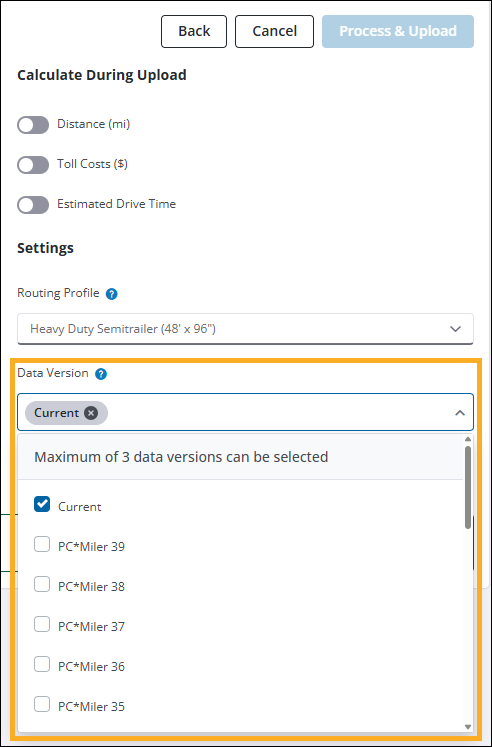
By default, Current is always selected. You can remove a version by selecting X next to the specific version you want to remove, or unchecking it from the dropdown list.
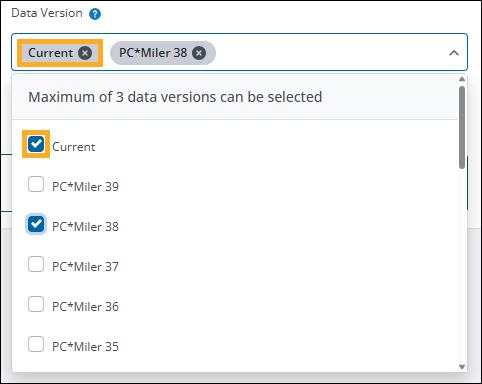
-
In relation to multi-version processing, the selected data versions are now stated in the notification email and are also listed in the third column of the output file.
-
Your previously selected file settings are now retained for future file uploads. This enhancement aims to increase efficiency and reduce errors in selecting settings when uploading multiple files for processing.
Bug Fixes and other improvements
-
QuickBatch bug fixes:
-
Fixed an issue where the same file could be submitted for processing multiple times in succession due to the Process and Upload button remaining in an enabled state after the initial upload. The button is now greyed out and reads Processing… after being selected, preventing multiple submissions of the same file.
-
Fixed an issue where the Process and Upload button would be incorrectly enabled after switching to a different PC*Miler tab and returning to QuickBatch.
-
Addressed an issue where uploaded files would not process due to the file name containing too many characters. If a file is uploaded and the file name contains more than 60 characters, a notification is now displayed stating that the file cannot be uploaded.
-
Updated download link in QuickBatch notification email. The link now directs to the QuickBatch tab and automatically triggers the file download process.
-
-
Fixed an issue where new routes would get stuck in a loading state after running the route and then editing Street Adherence settings in the Route Options pane.
-
Fixed an issue where the Reports pane would not load if PC*Miler Web was launched using the Applications menu from within another Trimble Maps product.
-
Fixed issues regarding exported reports when selecting .CSV as the file type. This fix addresses formatting issues and missing stop names for intermediate stops.