2026 Releases
March 25, 2026
New Features & Enhancements
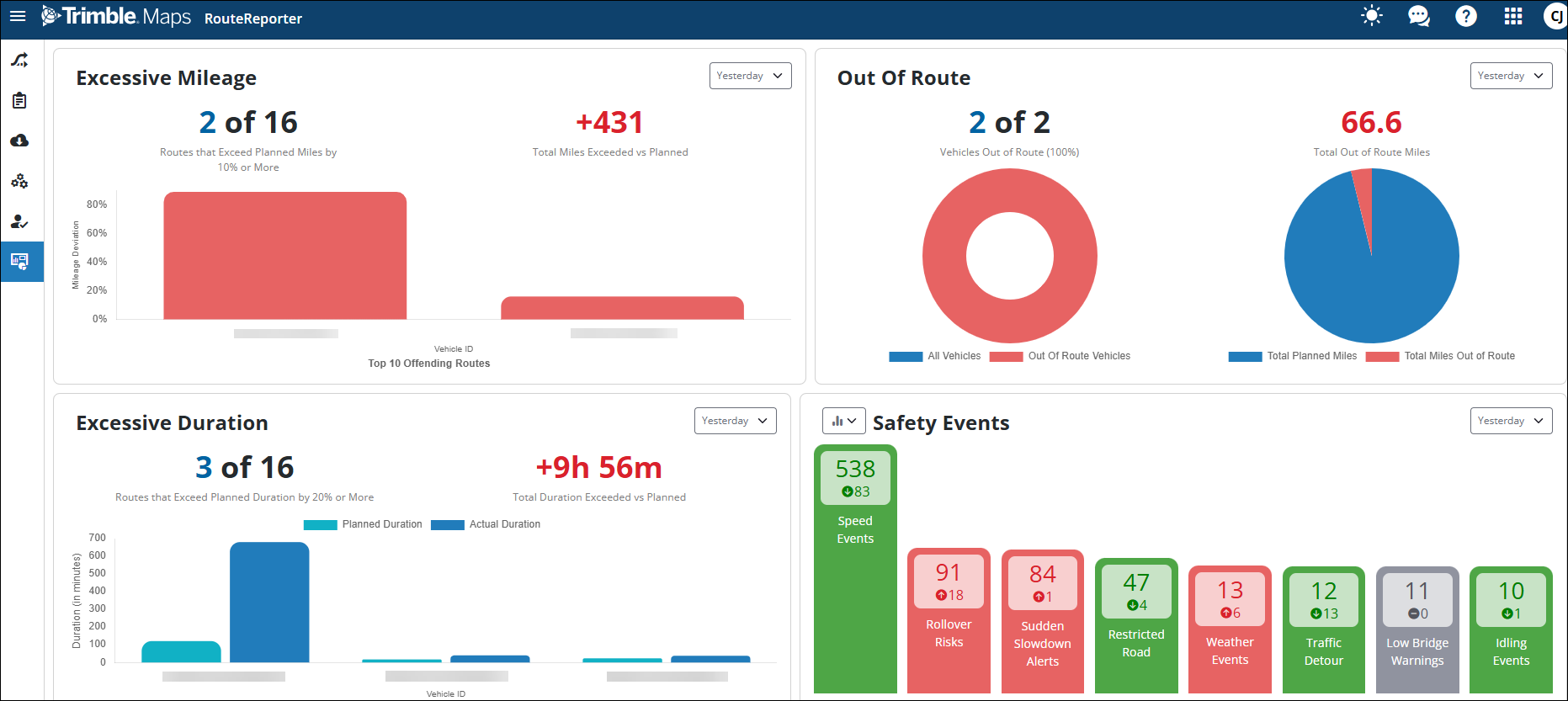
Visualize fleet performance with the new Dashboard
A new Dashboard provides actionable insights into your fleet’s recent on-road activity and safety events. At a glance, you can view up-to-date information about route deviations and potential cost savings, including:
-
Excessive mileage
-
Higher than planned toll costs
-
Out-of-Route mileage
-
Excessive duration
-
Safety events (speed, rollover, and low-bridge warnings)
Sudden slowdown event icon
Safety event visualization has been enhanced by implementing a new dedicated icon  for "Sudden Slowdown" events. This enhancement allows users to easily identify and differentiate sudden slowdown events from other safety events on the map and in reports.
Bug Fixes
-
Resolved an issue where route lines were rendered on top of street names; street names now appear on the top layer for improved readability.
-
Fixed a UI issue where the TripID was not fully visible, causing the DriverID to disappear on certain Route Details pages.
-
Resolved a critical issue where certain users received "no reports found" emails despite valid data existing for the selected date range.
-
Fixed an issue where trips remained in "In Progress" status despite the receipt of completed route data or trip cancellations.
-
Fixed a defect where the map remained in light mode after a user switched the application to dark mode.
-
Fixed a bug on the summary page where the 1st prescribed route was incorrectly displayed instead of the 2nd prescribed route.
Feb. 26, 2026
Bug Fixes
This includes bug fixes to improve the overall user experience and data accuracy in RouteReporter. Key highlights include:
Dashboard & Map Visualization
-
Fixed an issue where the Y-axis on the Excessive Duration card displayed units in seconds despite the label stating minutes.
-
Resolved a bug where the line graph on the safety events card was not displayed correctly when using the Firefox browser.
-
Fixed an issue where trips were missing GPS pings on the map, ensuring all GPS pings are rendered and the route line extends to the destination.
-
Fixed an issue where live GPS positions and the actual route line were missing for vehicles sending real-time data.
-
Fixed a bug in the summary page where the wrong prescribed route (1st instead of 2nd) was displayed on the map.
-
Resolved a critical issue where opening a route card resulted in a blank page. This was caused by missing validation requirements (Region and DataVersion) during the API call, which has now been corrected to ensure route info displays consistently.
Reporting & Data Accuracy
-
Investigated and addressed discrepancies where the exported report showed a different distance (e.g., 362.55) compared to the actual distance shown in RouteReporter (e.g., 8.92).
-
Fixed an issue where the planned distance was incorrect for many routes when generating a report for the full fleet via "View All Vehicles," ensuring it matches the data shown when filtering by a single vehicle.
-
Resolved a discrepancy where Out-of-Route (OOR) distance differed between the Reports view and the Events tab in the details page.
-
Fixed an issue where completed trips were remaining in "In Progress" status due to backed-up queues; the split into separate workers resolves this.
General UI & User Management
-
Fixed a bug where users were unable to save or update any settings in the Account Settings page, causing the page to spin indefinitely.
-
Corrected the View All Drivers functionality to ensure it lists all drivers for the account, even after previously selecting a specific driver group.
-
Addressed an issue where the UI logged users out within an hour.
-
Fixed the AI Chat feature to ensure it responds with correct data instead of returning "No trips" or "No vehicles" for pre-canned questions.
-
Resolved an issue where users with the "Support" role in certain partner accounts saw "No Routes" when looking up vehicles.
-
Implemented various accessibility fixes, including correcting input labels, updating email input types, and improving button contrast and keyboard navigation.