Icons and menus are not loading in PC*Miler Web
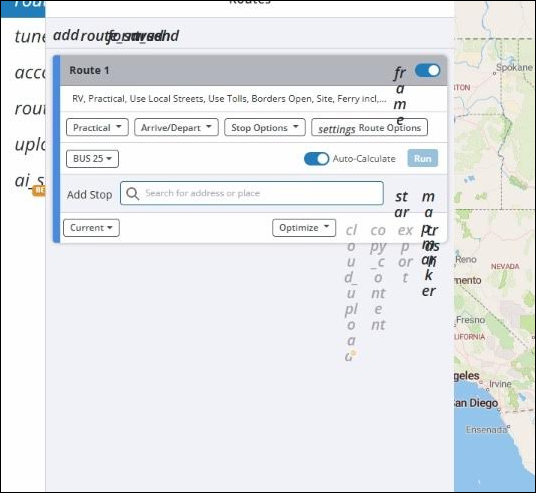
If you are experiencing an issue where icons and menus are not loading correctly in PC*Miler Web, this is likely cause by an ad-blocker or security extension installed on your computer’s browser.
To resolve this issue, try the following steps:
-
Identify the ad-blocker or security extension in your browser that may be blocking PC*Miler Web content. This can be done by reviewing the list of installed extensions in your browser settings, and disabling any ad-blockers or security extensions one by one to determine which extension is causing the issue.
-
Once you have identified the extension that is blocking PC*Miler Web content, do one of the following:
-
For frequent users, we recommend adding https://cdn.jsdelivr.net/npm/@trimble-oss/ to the list of trusted sites in your extension’s security settings. Once added, refresh the page to allow for the icons and menus to load correctly.
-
For occasional users, or if you are signing in from a unique device, you can temporarily disable the extension in your web browser. Then, refresh the page to allow for the icons and menus to load correctly.
-
If you are still experiencing issues after trying these solutions, we suggest trying a different web browser to see if the issue persists. If the icons and menus are still not loading, please contact our Trimble Support team for further assistance.