Adding rows or columns to an existing table
After you create a table based on quantity ranges, you may need to add more rows or columns. When you use the  Add Row or
  Add Column commands, the system picks up where your table left off.
Add Row or Add Column commands, the system picks up where your table left off. This illustration shows a weight range in an existing rate table. The last numeric value in the range is 40,000. The maximum rate is $1.08.
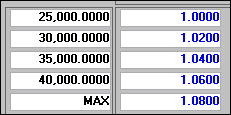
When we click Add Row, the system:
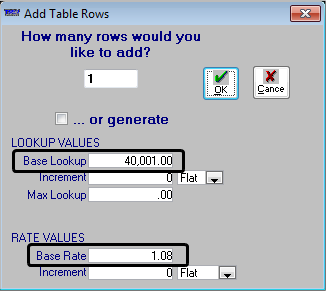
Add Row, the system: Defaults the Base Lookup field to 40,001.
Notes:
1. Our table ended with a quantity of 40,000 pounds, so the system defaults to the next possible quantity, or 40,001 pounds.
2. If you change the value, the value you enter must be greater than the table's current highest lookup value.
Defaults the Base Rate field to $1.08.
Note: The last rate in the table is $1.08, so the system defaults to that rate.
Note: For more information about using the Add Table Rows window, see Generating table values automatically.
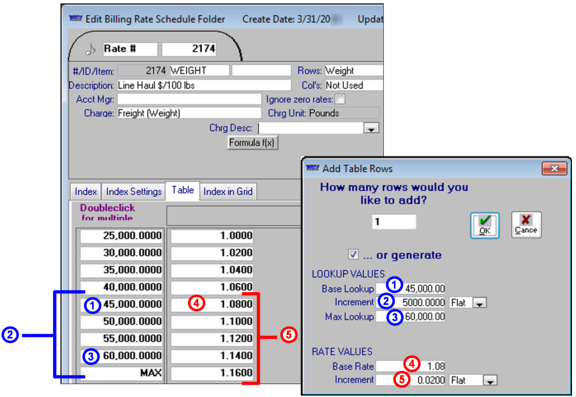
The requirements for the rate table determined our entries in the window.
Requirements for quantity ranges | |
To set up this requirement . . . | . . . we did this |
Next quantity in the weight range is 45,000 pounds | Under LOOKUP VALUES, entered 45,000 in the Base Lookup field |
Weight quantities increase in increments of 5,000 pounds | Under LOOKUP VALUES, entered 5,000 in the Increment field |
Last weight quantity in the range is 60,000 pounds | Under LOOKUP VALUES, entered 60,000 in the Max Lookup field |
Requirements for rate ranges | |
To set up this requirement. . . | . . . we did this |
For weights that are between 40,001 – 45,000 pounds, the rate is $1.08 | Under RATE VALUES, left $1.08 in the Base Rate field |
Rates increment in two-cent increments | Under RATE VALUES, entered $.02 in the Increment field |
The numbers in the tables correlate with the callouts in this illustration.
To save your work, click OK to close the window, then click  Save in the sheet toolbar.
Save in the sheet toolbar.