TruckMate 2026.1 New Features: Back Office
Released: January 16, 2026
Last updated: January 16, 2026
General
Updated email address checking to be consistent across applications (TM-176192)
Previously, email address validation logic was not consistent across applications. Some applications prevented you from proceeding if the email address was invalid. others only provided a warning. Some applications did not validate email addresses at all.
Now, the validation logic is consistent across applications. Each application will validATE the email format. If there is an issue, a warning will open. You can then choose to edit the email address or accept it as-is.
Employee normalization (TM-178688)
In TruckMate version 2023.3, the payroll-related schema structure was modernized. The legacy PR_EMPLOYEE table was split into six new specialized tables and two pre-existing tables (ADDRESS and USERFIELDS). This structure improves system maintainability and sets a foundation for future improvements.
As of TruckMate version 2026.1, all payroll-related applications have been updated to use this structure. The applications include:
-
ADP - Payroll Export
-
Check Printing
-
Driver Profiles
-
Employee Data
-
HR Recruitment
-
Payroll Processing
-
Payroll Time Sheets
Payroll 2026 Q1 updates (TM-185610)
Several changes have been made to support the required US and Canadian payroll compliance updates for Q1 2026. These include:
-
A full update to the IRS Form 941 wizard
-
Two Payroll Processing (PRRegister.exe) fixes
-
Improved T4A error messaging for Canadian users
-
Advisory notes for US overtime reporting changes
-
A new Québec RL-1 obligation for the trucking industry
Added MagMedia Wizard direct deposit refund fields (TM-188708, TM-188771)
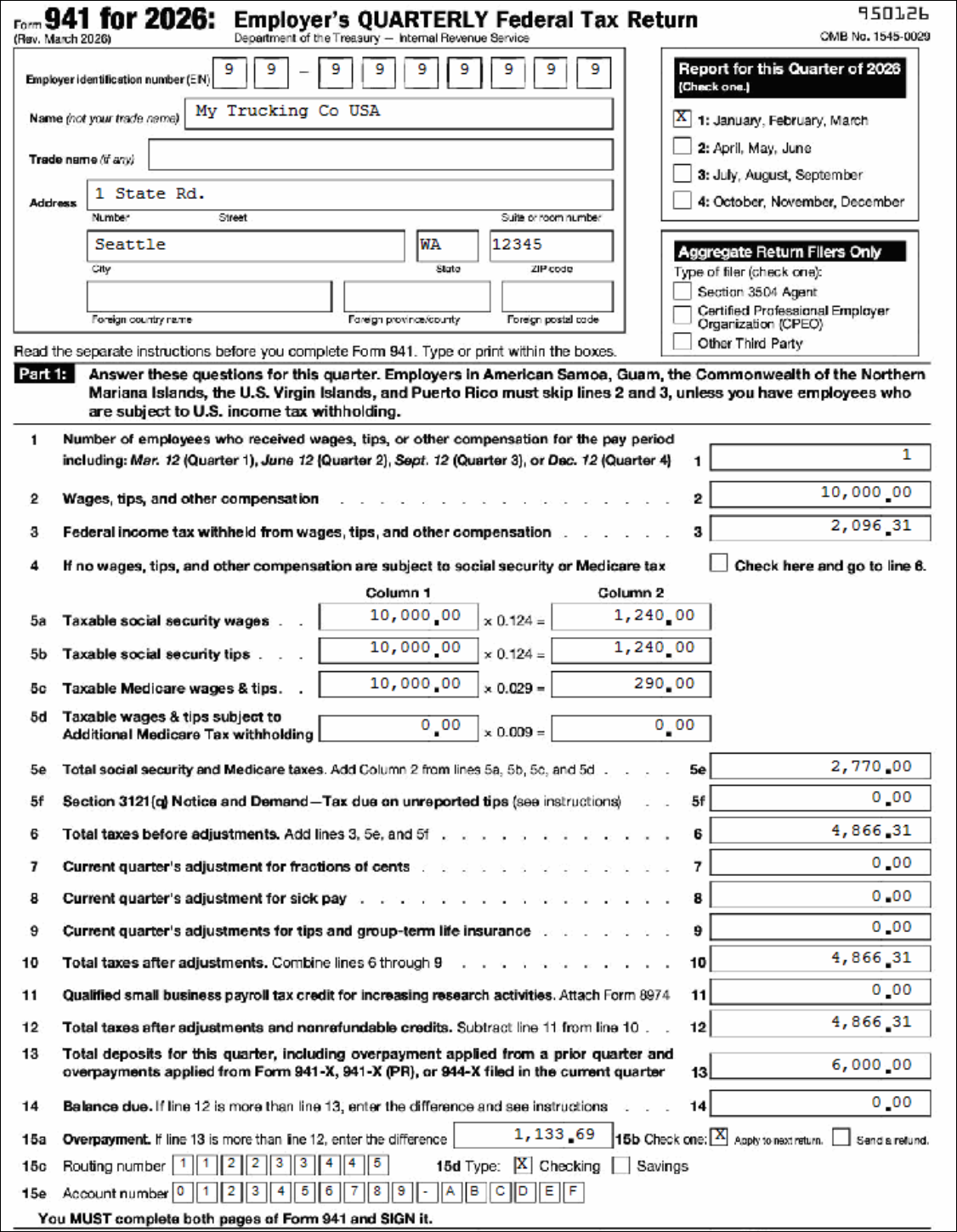
The IRS revised Form 941 in March 2026. The changes expanded the overpayment section to support direct deposit refunds. Form 941 in Payroll and Returns Generator (MagMedia.exe) has had its wizard updated to match these changes.
Previously, line 15 was a single line for the overpayment amount:

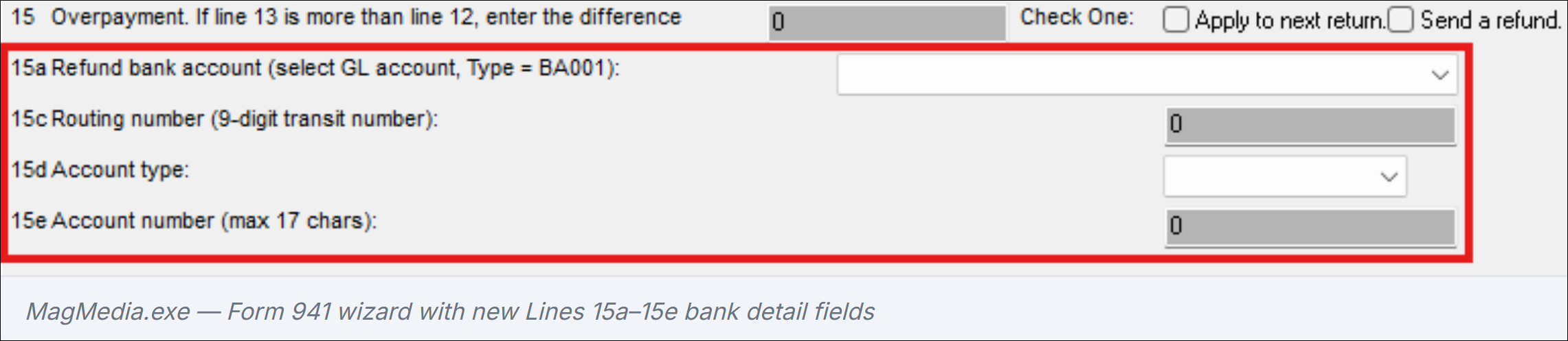
Now it includes lines 15a-15e. These lines include the routing number, account type, and account number:

When a GL bank account (type BA001) is select for the 15a dropdown menu, the routing number (15c), account type (15d), and account number (15e) are autopopulated from GL Chart of Accounts.
If you use the direct deposit refund option, you have to complete some setup:
-
Open GL Chart of Accounts (Glm.exe).
-
If it is not already open, select the Account Info tab.
-
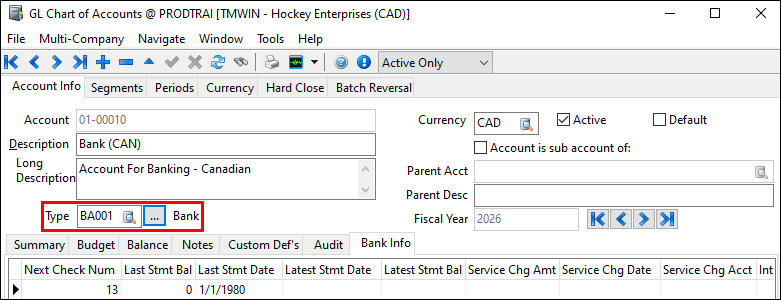
Navigate to your bank account. The Type should be BA001.
-
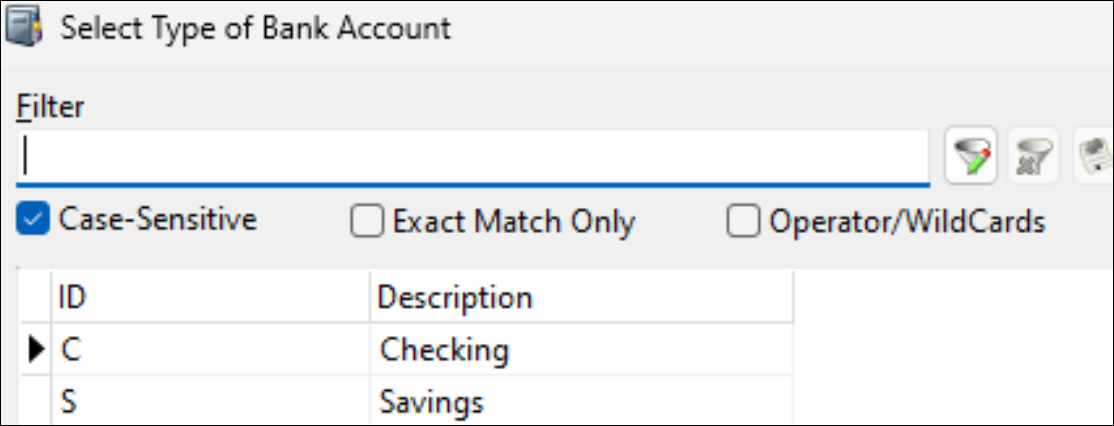
On the Summary tab grid, double-click in the Acct Type column. The Select Type of Bank Account window opens.
-
Select either Checking or Savings.
-
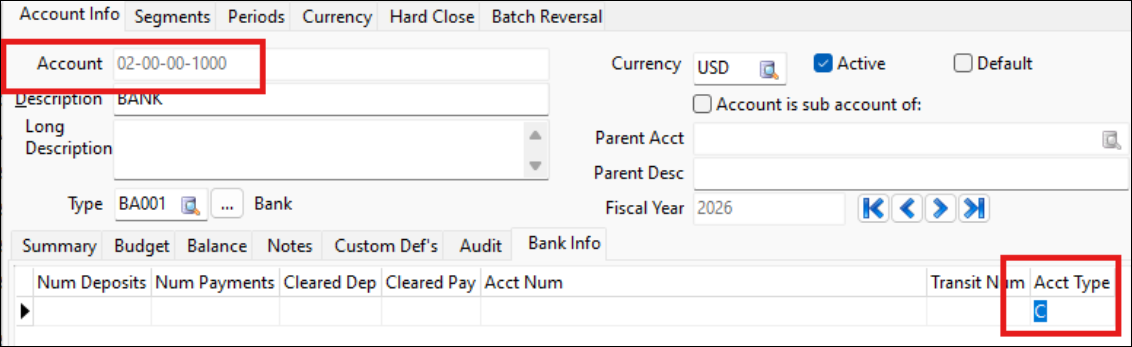
Select OK. The Select Type of Bank Account window closes. The Acct Type column updates to the type you selected.
-
Select
 Post.
Post.
Updated the US 941 and Schedule B in Crystal Reports
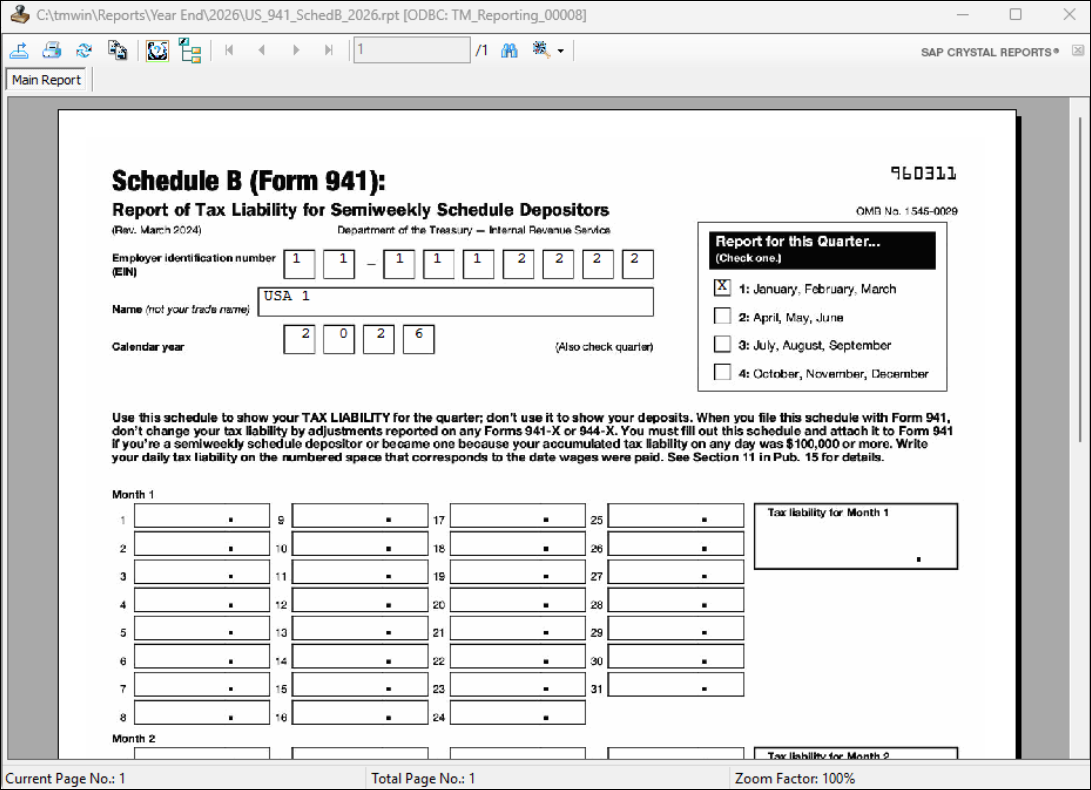
Both the US 941 and US 941 Schedule B forms have been updated in Crystal Reports to match the 2026 revised layout.
-
US_941_2026.rpt: Main form 941 (rev. March 2026)
-
US_941_SchedB_2026.rpt: Schedule B (semiweekly depositors)
Setup warning now persists on every Calc Source Deds run for Minnesota PFML (TM-187649)
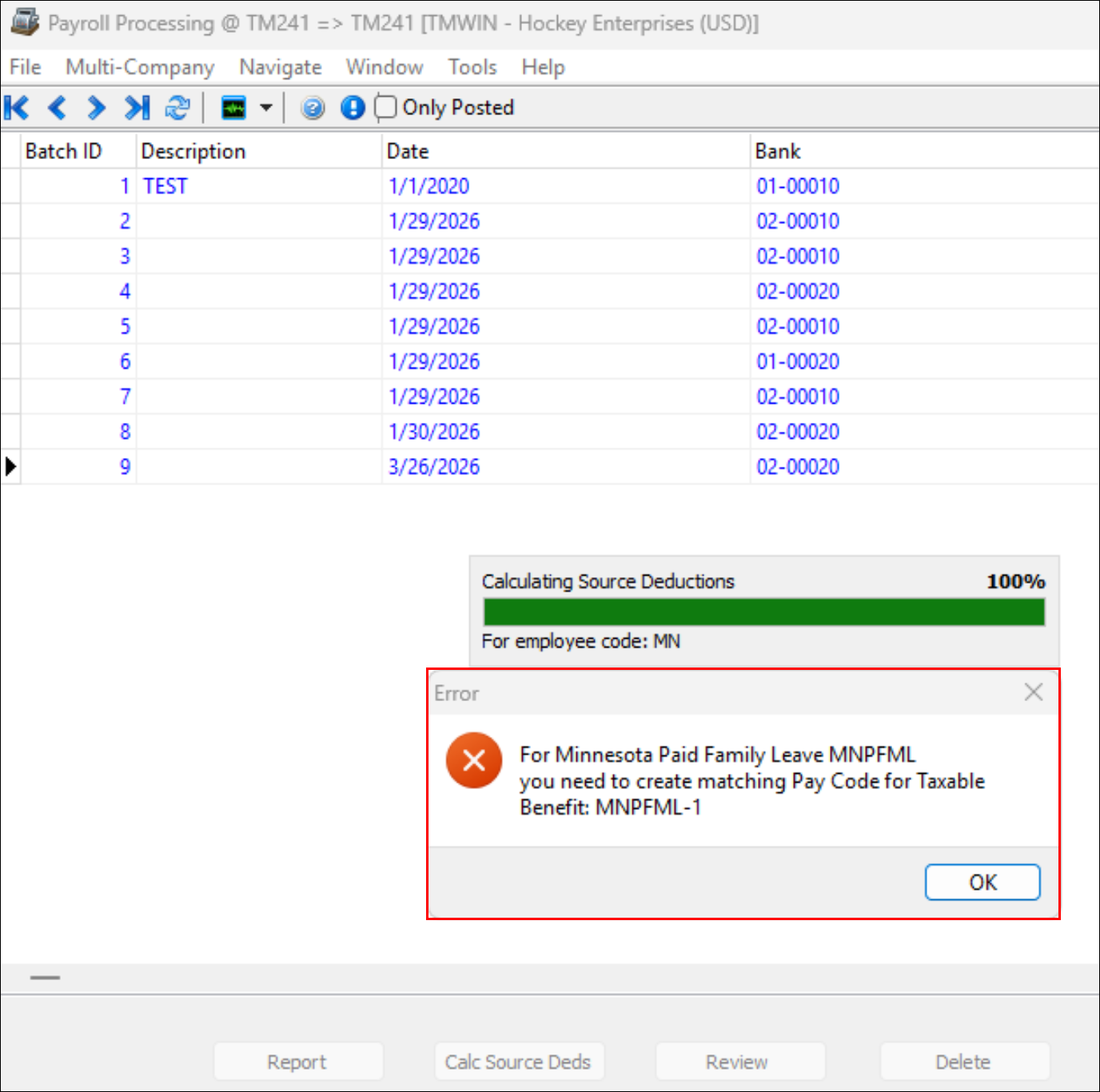
When running Calc Source Deds for Minnesota employees where the employer pays more than 50% of the PFML (Paid Family Medical Leave) contribution, PR Register needs a matching taxable benefit pay code to be configured in Payroll Configuration.
| Minnesota customers: If you need assistance setting up the required taxable benefit pay code in Payroll Configuration, contact Trimble Transportation Support. |
Previously, the setup warning only appeared the first time a user selected Calc Source Deds. If a user dismissed the setup warning and selected Calc Source Deds a second time without completing the setup, the warning did not reappear. The register then ran with incorrect deductions.
This issue has been resolved. Now, the warning reappears on every attempt until the pay code is properly configured.
Validation now identifies the specific driver or vendor in error messages (TM-186403)
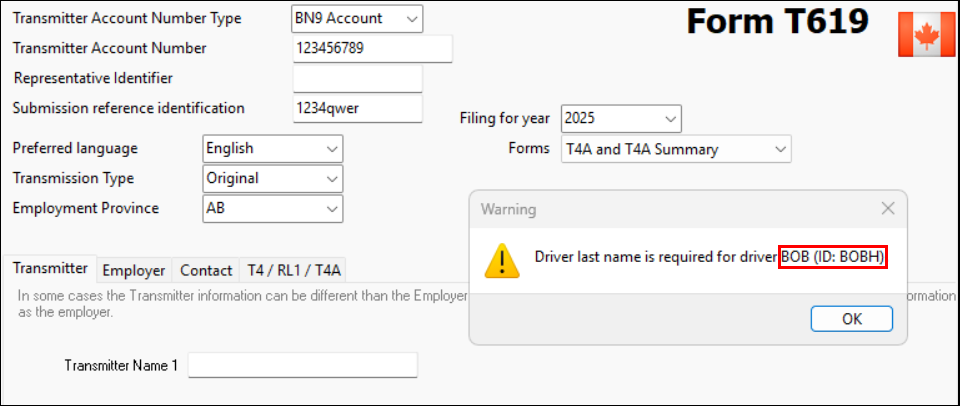
Previously, T4A XML validation in Payroll and Returns Generator reported errors without specifying which driver or vendor was affected.
Error messages now include the driver’s or vendor’s name and ID.
Calc Source Deds option no longer disabled on first batch at startup
Previously. when PR Register first opened, the Calc Source Deds option was incorrectly disabled for the first batch displayed.
The option is now correctly enabled on startup.
US Overtime Deduction (OBBBA) year-end action required (TM-184068)
The One Big Beautiful Bill Act (OBBBA) introduced a federal tax deduction for qualifying overtime pay. No changes to TruckMate payroll calculations are required for Q1 2026. However, the 2026 W-2 will require new reporting:
-
There is a new Box 12 code, TT. It reflects total qualified overtime compensation per employee.
-
Box 14 is split into 14a and 14b for Treasury Tipped Occupation Codes
| You should begin tracking FLSA-required overtime amounts separately. This data will be needed for the new W-2 Box 12 TT field when TruckMate’s year-end 2026 changes are released. |
New Revenu Québec RL-1 filing requirement for trucking vendors (TM-188355)
Effective for the 2025 taxation year, Québec trucking businesses must file an RL-1 slip (Box O, code RD). This slip is for fees paid to Canadian-controlled private corporations (CCPCs) in the same industry, even when no Québec income tax was withheld.
The existing vendor RL-1 functionality in Payroll and Returns Generator already supports this scenario. If you are affected by this new requirement, you should review your 2025 vendor payments and consult your accountant or Revenu Québec to confirm which payments qualify.
Finance API improvements (TM-186722)
Multiple improvements have been made to the TruckMate Finance REST API and related applications. These changes improve data accuracy, API reliability, and developer usability for:
-
AP Invoice Entry
-
AR Cash Receipts
-
GL Chart of Accounts
-
Interline Payable Audit
-
Driver Payments endpoints
AP Invoice API
The PUT /apinvoices endpoint now automatically recalculates due dates, discount dates, and aging dates when the GL Date or Invoice Aging Date changes. This now matches the current behavior for these applications.
New AP invoices correctly inherit currency code, intercompany flag, and payment terms from the vendor profile. Expense lines now expose invoice-currency fields (expenseBillRate and expenseAmountInInvoiceCurrency) on GET. They also accept an option isBillRate flag on POST/PUT for invoice-currency writes.
GL Accounts
Multiple GL accounts can no longer be set as the default for the same account type and currency within a company. POST /glAccounts now always returns the newly created account, even in multi-company environments.
Interliner Payables and Driver Payments
Probill validation now approves transitions only, removing a false block on normal edits. A new legDate field has been added to driver payment endpoints. The paymentDate field is deprecated but still functional.
API quality
Previous, numerous endpoints were returning incorrect HTTP status codes. They would return 200 instead of 404 and 500 instead of 400. These endpoints now show the correct error number and include descriptive error messages.
Desktop application fixes
Fixes were applied to several desktop applications as a part of the Finance API improvements:
-
AR Cash Receipts
Dismissing the check-applied confirmation prompt now correctly cancels the operation. The Deposit To field now properly requires a valid bank account. -
GL Chart of Accounts
Child accounts with invalid parent accounts can no longer be saved. -
AP Invoice Entry
F/X entries on the Expenses tab now refresh automatically when driver deduction entries are added.
AR Cash Receipts
Added support for AR Cash Receipts to the Finance API (TM-186204)
Full API support for AR Cash Receipts is now available in the Finance API. Customers and integrators can use the Finance API to:
-
Create, update, and delete cash receipts.
-
Apply payments to AR invoices.
-
Manage on-account payments.
As a part of this update, several fixes have been made to the AR Cash Receipts application (ARRCE.exe).
Added new Finance API endpoints
The Finance API now supports creating, retrieving, updating, and deleting AR cash receipts. Each cash receipt can be managed, along with its invoice payment applications (AR Payments) and on-account payments, through dedicated sub-resources.
| Method | Endpoint | What it does |
|---|---|---|
GET |
/finance/cashReceipts |
List cash receipts |
GET |
/finance/cashReceipts/{cashReceiptId} |
Get a single cash receipt |
POST |
/finance/cashReceipts |
Create a cash receipt |
PUT |
/finance/cashReceipts/{cashReceiptId} |
Update a cash receipt |
DELETE |
/finance/cashReceipts/{cashReceiptId} |
Delete a cash receipt |
POST |
/finance/cashReceipts/{id}/arPayments |
Apply payment to an AR invoice |
PUT |
/finance/cashReceipts/{id}/arPayments/{arPaymentId} |
Update applied payment |
DELETE |
/finance/cashReceipts/{id}/arPayments/{arPaymentId} |
Remove applied payment |
POST |
/finance/cashReceipts/{id}/onAccountPayments |
Add on-account payment |
PUT |
/finance/cashReceipts/{id}/onAccountPayments/{onAccountPaymentId} |
Update on-account payment |
DELETE |
/finance/cashReceipts/{id}/onAccountPayments/{onAccountPaymentId} |
Remove on-account payment |
The API enforces the same business rules as the desktop application. This includes write-off thresholds, intercompany restrictions, multi-currency validation, and balance checks.
Correct Client ID now recorded after applying a payment
Previously, in AR Cash Receipts, when you applied a payment on the Bills tab, the wrong Client ID was written to the applied payment record. This caused the Applied tab to show incorrect client information against each payment line.
The correct Client ID is now recorded consistently, regardless of how the payment is entered.
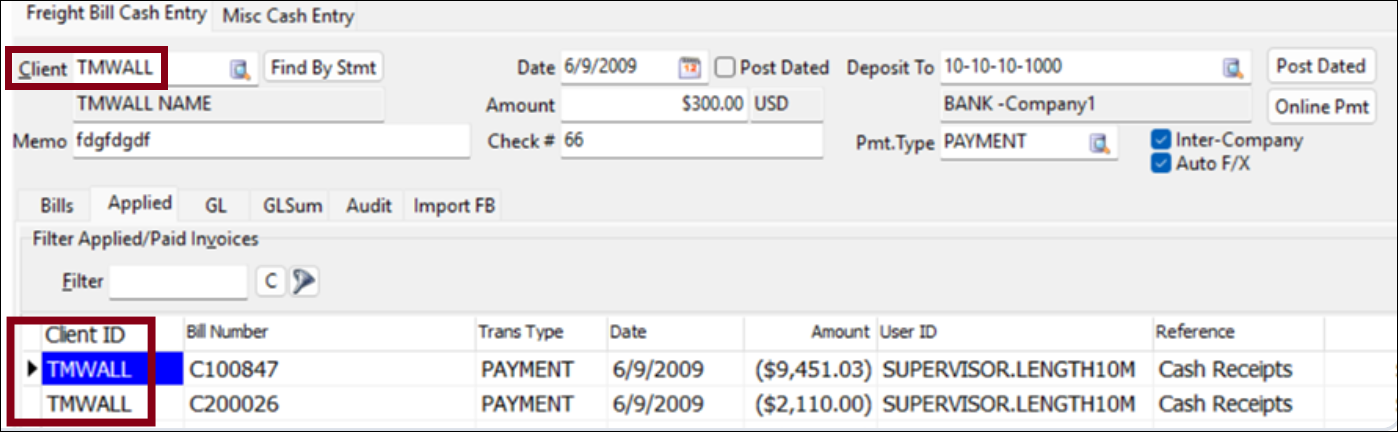
GLeneral Leder now updating when date changes
Previously, in AR Cash Receipts, changing the Date field on the Freight Bill Cash Entry tab did not automatically update the associated General Ledger (GL) entries on the GL tab. The GL had to be corrected manually after saving, which could lead to errors.
The GL tab now reflects the updated date correctly after saving.
Corrected GET /finance/cashReceipts field names
Previously, the GET /finance/cashReceipts and GET /finance/cashReceipts/{cashReceiptId} responses returned incorrect field names.
The field transactionType has been corrected to paymentType. Related field names have been aligned with the OpenAPI specification and the field names in AR Cash Receipts.
Codes Maintenance
Added option to change the number of emails that can be sent per minute (TM-185248)
Microsoft 365 enforces a limit of 30 emails sent per minute. Any emails sent beyond this limit are rejected and not re-sent by Microsoft 365.
To account for this, two options have been added to the Email Setup Servers > Servers tab of Codes Maintenance. These options are:
-
Maximum E-Mails per round
-
Sleep duration between rounds (sec)
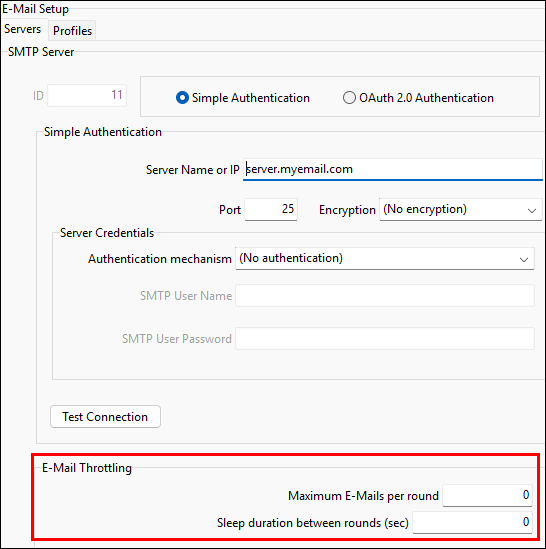
If you use Microsoft 365, you should set the Maximum E-Mails per round field to a value lower than 30 to avoid email rejections.
Customer Service
Improved OS&D visibility on short items (TM-183042)
When a freight item is deleted, the system now checks whether that item was associated with a short OS&D (over, short, and damaged) record. If it was, a Status History entry is written to the OS&D record before the item is removed. This preserves the identity of the deleted item for future reference.
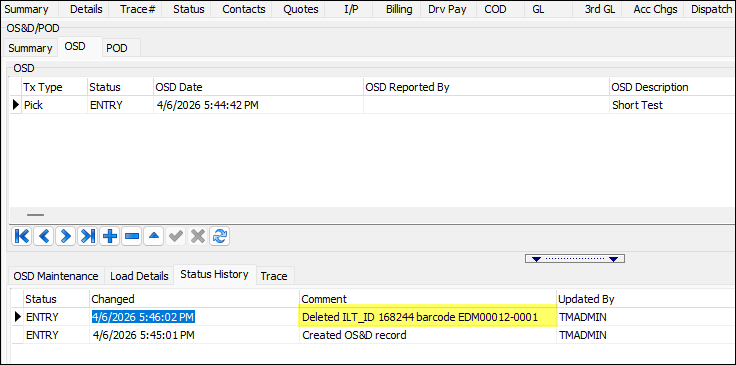
EDI Communication Manager
Added SFTP script option for SFTP workflows (TM-185423)
Because SFTP support has been added to TruckMate, an SFTP Script option has been added to EDI Communication Manager.
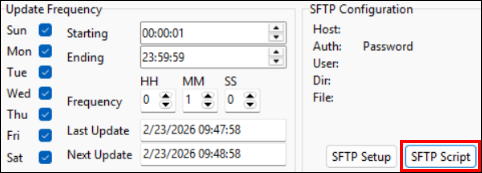
This option has the same functionality as the pre-existing FTP Script option:
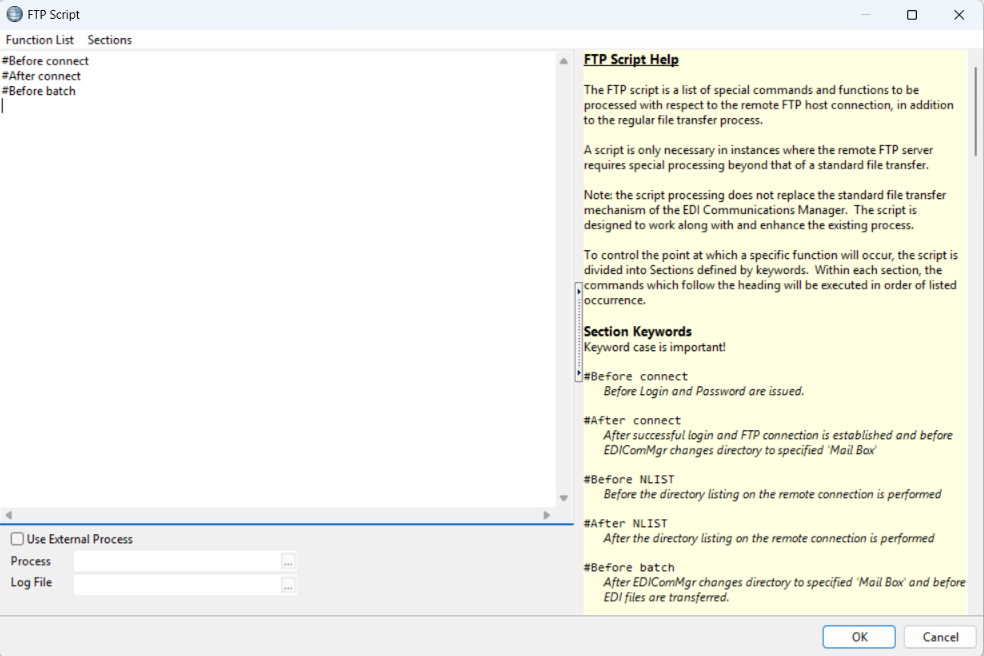
Select SFTP Script to create your own scripts that can appropriately handle incoming files.
Added Auto-delete option for FTP and SFTP (TM-185427)
In EDI Communications Manager, an Auto-delete after download option has been added for all inbound transaction types.
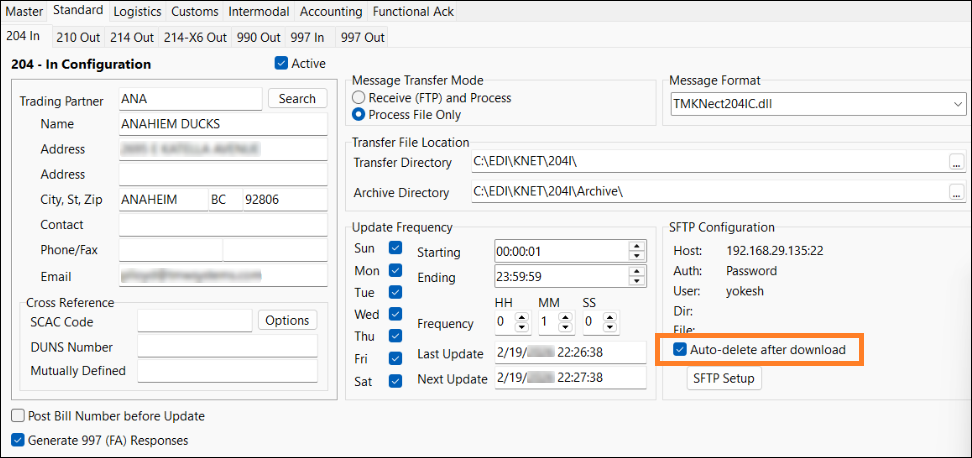
This option is cleared by default.
When this option is selected, if you have a proper FTP setup, files are automatically deleted after a successful download.
Added freight bill details to indicate pick and drop stops (TM-187172)
The TMEDILink204OC map now emits TL/FB per stop with P/D and stop number fields. The freight bill also includes SID when present. This adds support for x-stop freight bills.
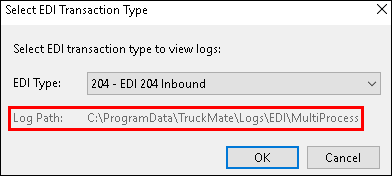
Added auto-creation of multi-process log paths (TM-187328)
Previously, there were scenarios where the Multi Process workflow would not create a corresponding log directory. This caused no logging to occur for these transactions.
Now, if the log path does not exist, the system automatically creates it and begins logging correctly.
Custom Defined Fields map modification (TM-187331)
EDI files are in uppercase. Because of this, when a map is generated, the whole file is changed to uppercase.
When inserting custom defined field list values, existing code verifies if the incoming value is acceptable. In some scenarios, because mixed-case records were being received, problems were caused with data conversion.
To fix these scenarios, the system now analyzes the value included in the 204 IC map. It scans to see if a matching value is detected. If it finds a match, it extracts that custom defined field value and uses it, even if the cases do not match.
Corrected pick/drop address display (TM-187334)
Previously, the addresses on pick/drop stops (ORIGADDR1 and DESTADDR1) were being trimmed. This issue has been resolved.
Added latitude/longitude data to 204OC maps (TM-187620)
The TMEDILink204OC map now outputs latitude and longitude data on Record 06. It uses GPS data from Customer and Vendor Profiles when possible. It falls back to the profile’s zone when customer profile GPS information is not present. This requires that the customer profile is assigned a valid zone.
Updated the GPS format in the EDI204OC Standard Map (TM-187861)
Previously, GPS support was added to the 204OC map in DMS (Degrees, Minutes, Seconds).
Now, support has been added to the 204OC map for GPS coordinates in DD (Decimal Degrees). The map now uses the Precision Lat and Precision Long fields from Customer and Vendor Profiles where available. This supports up to 12 digits of precision for accurate location placement.
eManifest
Added support for US-bound 309-Cargo-Only manifests (TM-177965)
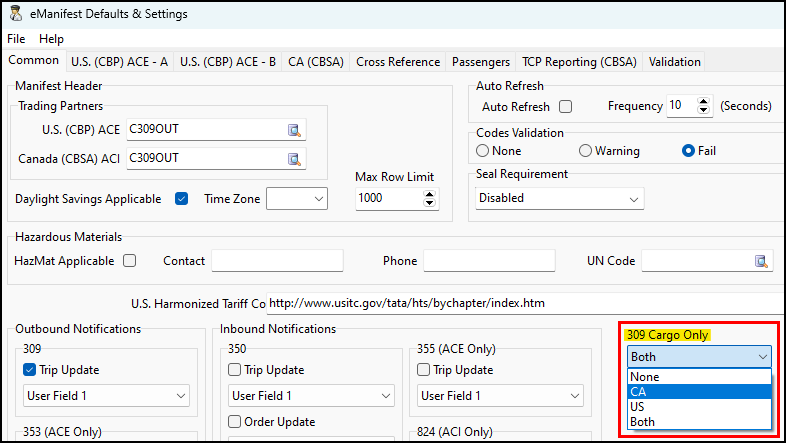
eManifest now supports US-bound (CPB/ACE) 309 cargo-only manifests. This workflow is similar workflow to the existing CA-bound (CBSA/ACI) implementation.
eManifest defaults and settings
In eManifest, 309 Cargo Only checkbox has been moved from the Defaults > CA (CBSA) tab to the Common tab. It has been changed to a dropdown list with country options:
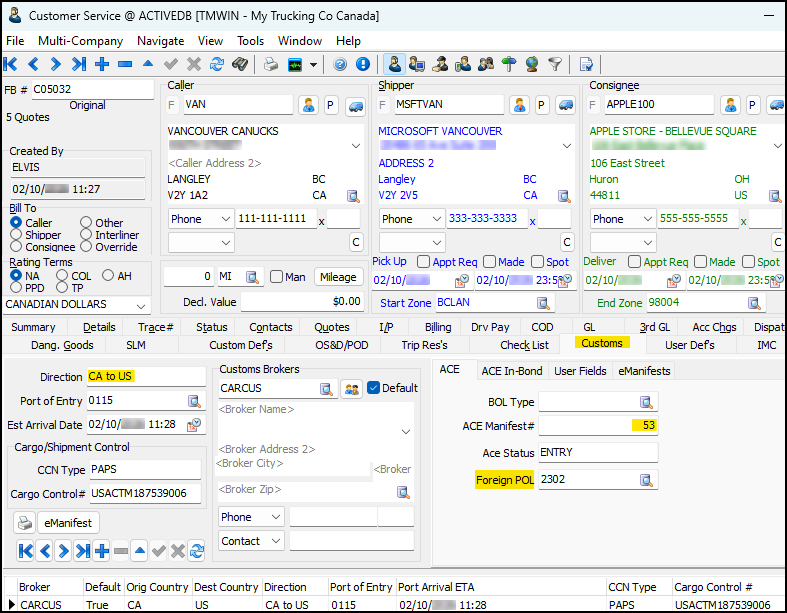
Customer Service Customs tab
Several changes have been made to the Customs tab in the Customer Service application:
-
The Customs tab now supports US-bound shipments.
-
A Foreign POL (port of lading) field for US-bound shipments has been added to the ACE subtab. The GET/POST/PUT tm/orderCustomsData endpoints have been enhanced to include this Foreign POL field.
-
309-Cargo-Only manifests are created with customs data from the order.
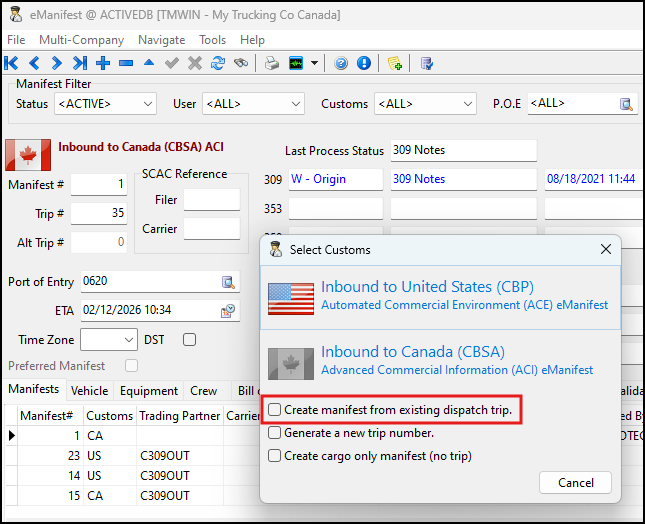
CBP 358 conveyance or bundle manifest from existing trip
When creating an eManifest from a US-bound dispatch trip, you can select the trip to use to create the manifest. To do this, select the Create manifest from existing dispatch trip checkbox.
You can then choose to create either a 358 conveyance manifest or a bundle:
-
358
Creates a 358 conveyance manifest using existing 309 Cargo-Only BOLs (bills of lading). -
309/358
Creates a combined 309/358 manifest directly from freight bills.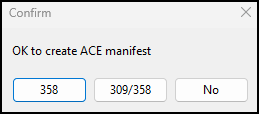
Application configuration option
A new application configuration option (app config) called EMAN.EXE - 309 Cargo-Only Manifest BOL Allotment has been added. This app config has two options:
-
Single
Restricts cargo-only manifests to one BOL. -
Multiple (Default)
Allows multiple BOLs per manifest.
BOL selection form
In eManifest, a new option called Advance has been added to the Bill of Lading tab.
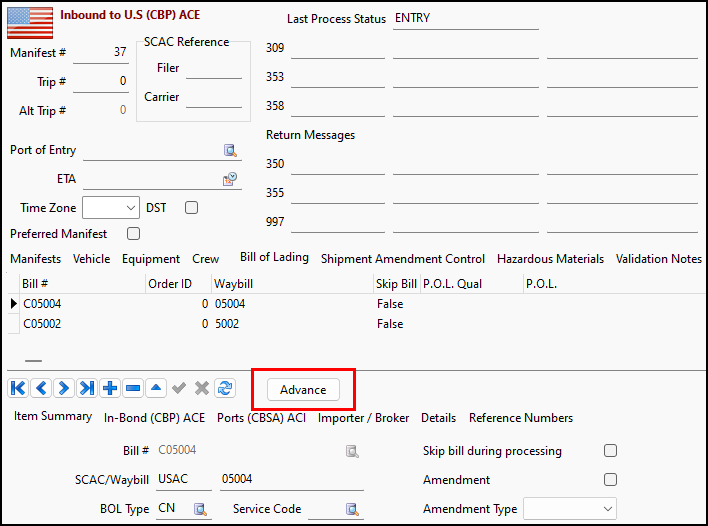
Select this option to open the BOL Selection window.
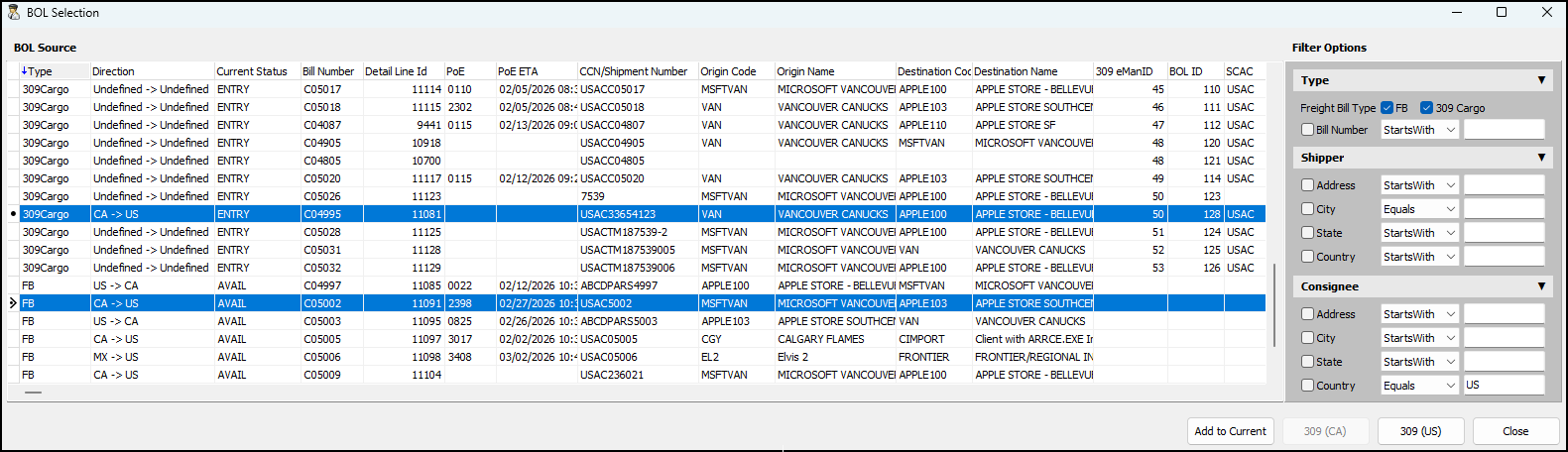
This window has these record types:
-
FB
Available freight bills for BOL creation -
309Cargo
BOLs from existing 309 Cargo-Only manifests
In this window you can:
-
Select Add to Current to add selected entries to the current manifest. If the bill number is the same, it replaces the existing BOL. If it is a different bill number, a new BOL is inserted.
-
Select 309 (CA) to create a new Canada-bound 309 Cargo-Only manifest using the selected entries.
-
Select 309 (US) to create a new US-bound 309 Cargo-Only manifest using the selected entries.
Fuel Card Data Import
Added duplicate data prevention when importing cards into tables (TM-187911)
Previously, the fuel card import process had no logic to prevent duplicates. It was possible to import duplicate sets of data without Fuel Card Data Import flagging it. Manual cleanup would then be required to remove duplicates.
The import process now prevents duplicate sets of data from being imported.
SQL Execute
Schema Checksum analysis at the patch level (TM-186638)
Previously, the SCHEMA_OBJECTS.IXF file was only available for base TruckMate releases. The Checksum workflow could not be executed at a patch level.
Now, to improve the migration experience by allowing custom code can be removed and reapplied, the export and import of the default schema data has been enabled at a patch level.