TruckMate 2026.1 New Features: Operations
Released: January 16, 2026
Last updated: January 16, 2026
Framework
Added key and password support for SFTP workflows (TM-187723)
SFTP supports using either an SSH (Secure Shell) key or a password for authentication. TruckMate already supports this configuration. However, SFTP also supports requiring both a key and a password in a two-factor authentication configuration. Previously, TruckMate did not support this.
TruckMate now supports SFTP servers that require both a multi-factor style public key and password authentication.
Updated SQL Execute and DB2 Database Creation Wizard to use new Security Patcher (TM-187314, TM-187315)
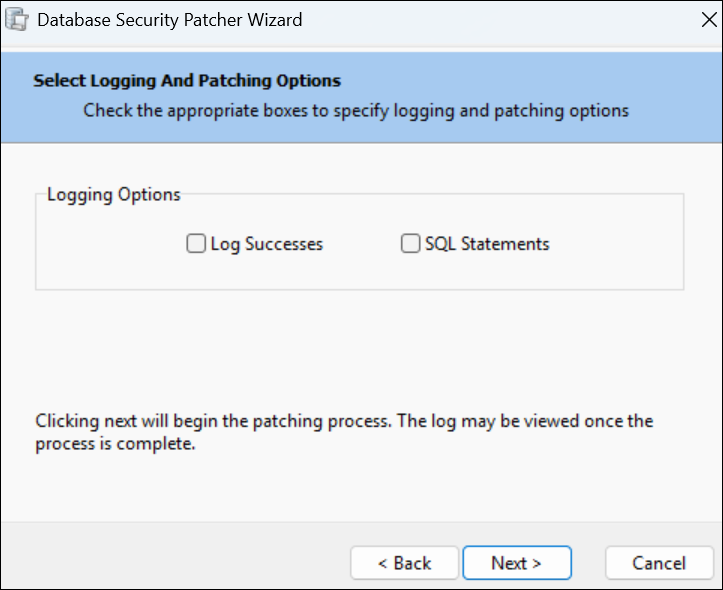
The Database Security Patcher Wizard has been updated. This affects both SQL Execute and DB2 Database Creation Wizard. They now use the new SP: TM_SECURITY_PATCHER instead of the Delphi code. This update improves Security Patcher performance.
As a part of this update, there were a few changes to the appearance of Security Patcher. Here is an illustration of its updated appearance:
Mobile communications
Mobile Comm REST API updates (TM-169706)
Several additions have been made to the Mobile Comm Rest API.
A Notifications tab has been added to Mobile Communications Properties. This tab has all the existing notification types. You can use this tab to configure which notification types are enabled for each mobile account. You can also set whether notifications should be deleted or marked as sent when acknowledged by the REST API consumer.
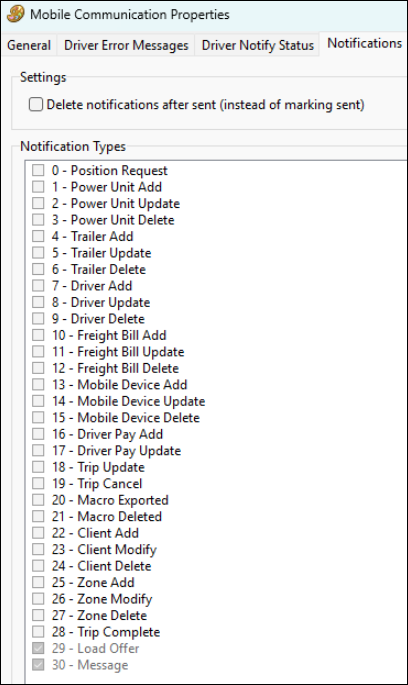
Three endpoints have been added to the Mobile Comm REST API:
-
GET Mobcomm/Notifications: Allows clients to retrieve pending notifications and acknowledge receipts.
-
PUT MobComm/Notification: Allows clients to update notifications.
-
POST MobComm/trailerSensors: Allows recording of trailer sensor data.
Support added for the ORBCOMM Asset Tracking REST API (TM-185613)
The Mobile Communications Service can now use ORBCOMM’s REST API in addition to the pre-existing SOAP integration:
-
Routing chooses between REST vs SOAP based on configuration (URL-based path).
-
Token auth uses
/generateToken(including support for theOrgKeysetting). -
Asset status is pulled via
/getAssetStatus. -
HTTP error handling covers responses such as 401, 429, 504, and 423. Retry behavior is tuned for rate limits and conflicts with other pollers.
-
REST payloads are mapped onto the existing ORBCOMM pipeline. This includes
message_return_pending, so downstream behavior stays aligned with the prior SOAP/XML flow.
To support these changes, options for MOBCOMM were added to the Configure Communications > Mobile Accounts tab in Communications Manager:
-
ORBCOMM REST API configuration options such as persistence of credentials and related settings.
-
An Org Key field. This value is saved and used for REST authentication (with username and password).
-
A polling Interval field. The interval cannot be set below five minutes.
New ORBCOMM accounts default their connection URL to the REST endpoint: https://platform.orbcomm.com/SynB2BGatewayService/api
Several database updates were also made to support these changes:
-
DB2: Added duplicate-messaging staging for OBRCOMM. A new table, DIAL_ORBCOMM_TEMP_DUP, tracks candidate duplicates by vehicle and message ID with indexes and table comment.
-
Operations: Table is registered in DATA_PURGE_MAIN_TABLE with INS_TIMESTAMP as the purge cutoff. This cleans up old rows automatically.
-
The MobileComm service can compare downloaded ORBCOMM messages against this staging data so it only inserts new traffic into downstream processing. This reduces duplicate handling.
Dispatching operations
Corrected Custom Defined Fields visibility (TM-172957)
Previously, a Custom Defined Field configured with MMDISP.EXE in its access program list would not appear in Multi Mode Dispatch. It would only appear if it has DISPATCH.EXE in the program list.
This has been corrected. Custom Defined Fields now appear in the correct application based on their program list.
Improved long combination vehicle planning (TM-174014)
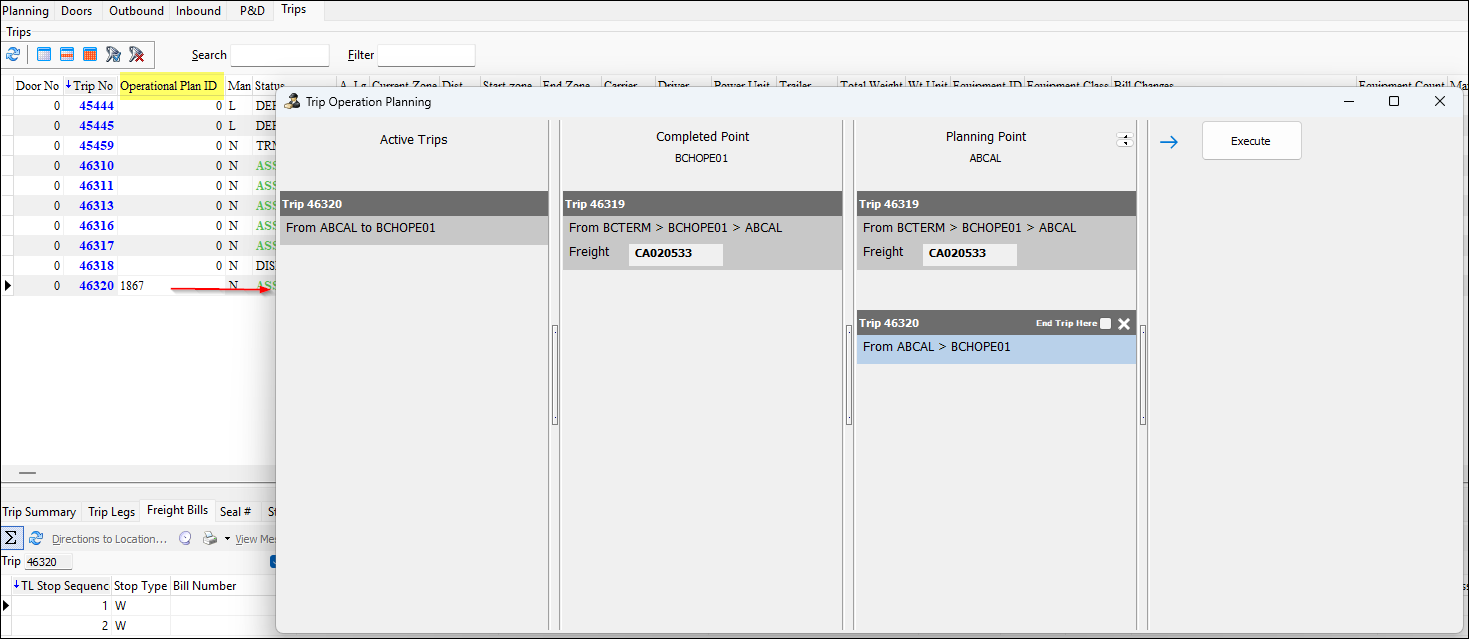
TurckMate now gives dispatchers clearer visibility and safer handling of long combination vehicle (LCV) work in Trip Operation Planning. Trip Operation Planning is available in Dispatch and Multi Mode Dispatch.
These updates include multiple updates to how trips are displayed, adjusted, and tracked:
-
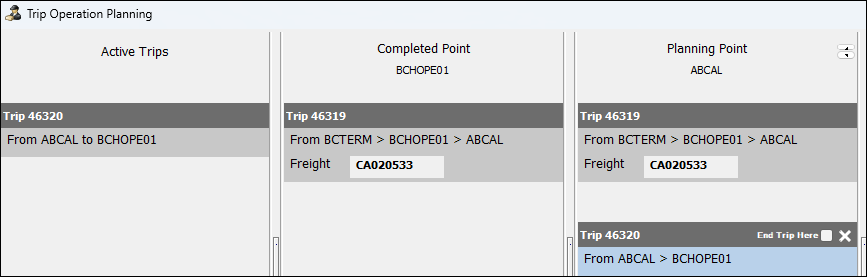
Complete and cancelled trips are now grayed out. Reopen Trip Operation Planning to refresh the view to match the current state of trips in the LCV movement.
-
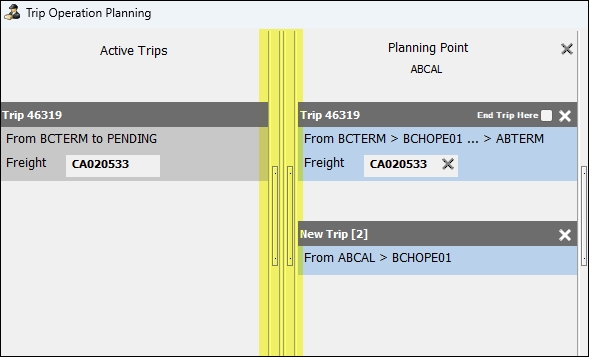
You can now collapse and remove columns.
-
Shortcut menu options and trip selection have been improved for common split, merge, and planning actions.
-
When splitting and merging, split/merge points now default where applicable.
-
Exclusive and non-exclusive trips can now be merged into one LCV movement.
-
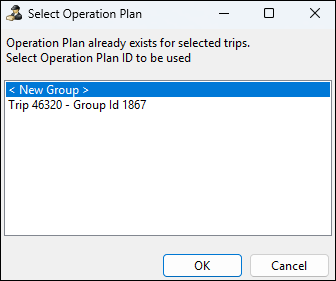
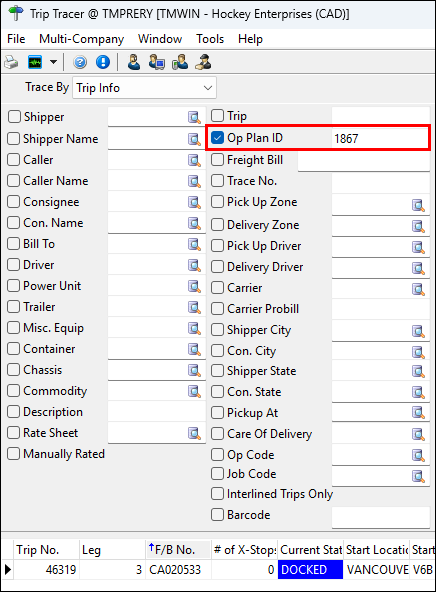
Trip Tracer can now search by Op Plan ID. This allows you to find all the trips tied to an operational plan.
 *
* -
An application configuration option (app config) called DISPATCH.EXE - TOP - Update Destination Zone to Origin when Cancel has been added. If this app config is set to True, when a trip that has been split or merged used Trip Operation Planning is cancelled at its Origin Zone, its Destination Zone updates to match its Origin Zone.
-
You can now open Trip Operation Planning to an existing operational plan. To do this, double-click a plan in the Operational Plan ID grid.
Redesigned the Dispatch and DCall trip queries (TM-184502)
Previously, if you had a CUSTOMER_GET_DISP_TRIP_QUERY or a CUSTOM_GET_DCALL_TRIP_QUERY, they would have to be modified any time you upgraded.
To avoid this, the following procedures have been dropped:
-
GET_DISP_TRIP_QUERY
-
GET_DCALL_TRIP_QUERY
-
CUSTOM_GET_DISP_TRIP_QUERY
-
CUSTOM_GET_DCALL_TRIP_QUERY
-
DISP_TRIP_QUERY
| The two CUSTOM procedures are only dropped if they are not in alignment with the standard custom stub. If they have been changed, they will remain on the system. |
Because of this change, you or the TruckMate engineering team then need to make a one-time update to convert the existing CUSTOM procedure into two custom tables:
-
CUSTOM_SQL_ITEM
-
CUSTOM_SQL_STATEMENT
Here is an example of what the conversion looks like:
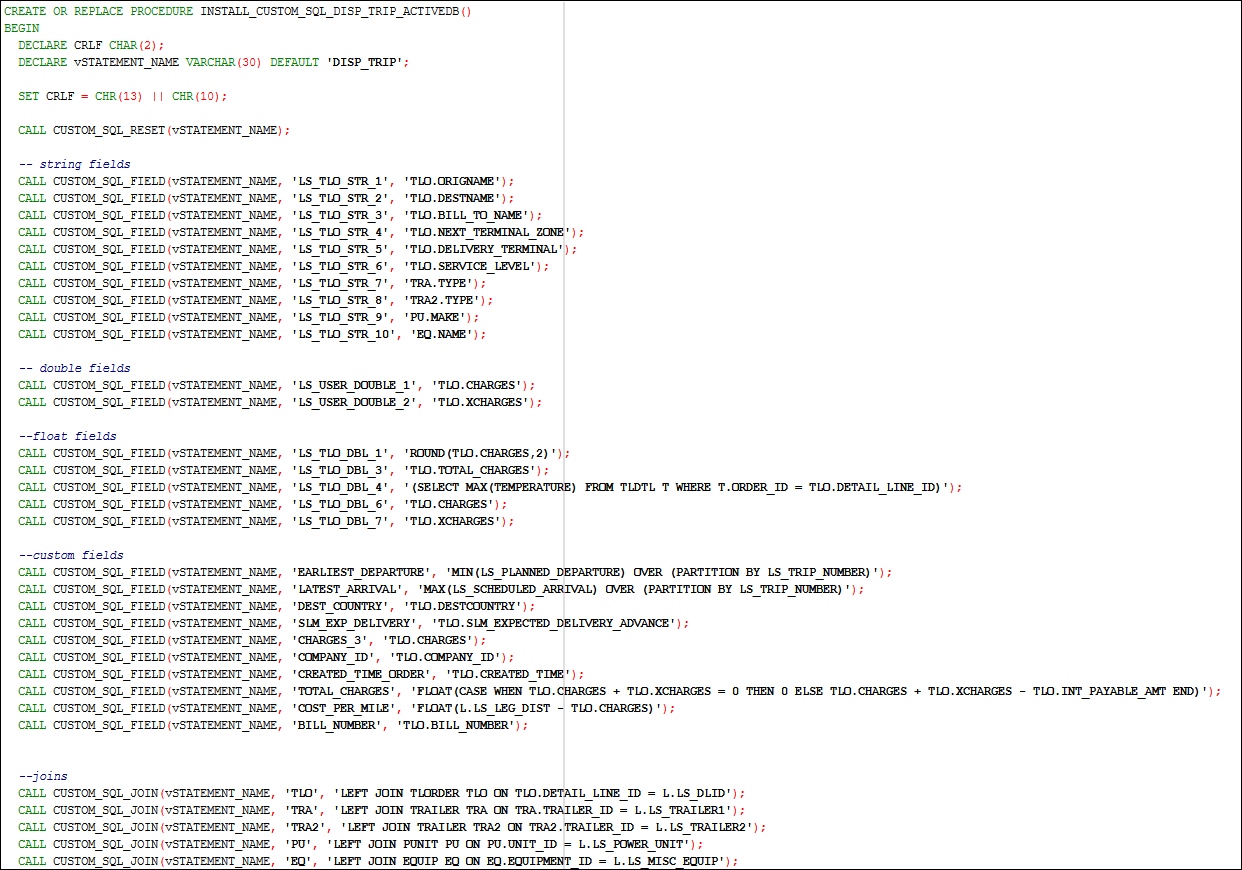
Once the conversion has been made, you will only need to make future alterations if you need to change elements of the custom code directly.
Removed the 500 record cap from Trip Tracer (TM-187332)
The 500 record cap when running traces in Trip Tracer has been removed. However, a system performance warning still appears when a user tries to run a trace that may include more than 500 records.
Impleted "STALE" orders workflow (TM-187387)
An automated process to help clean up "stale" orders in the system has been added. This includes a new:
-
STALE status code
-
Default Dawg
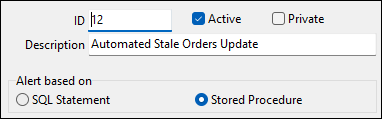
-
Stored procedure, COMPLETE_STALE_ORDERS
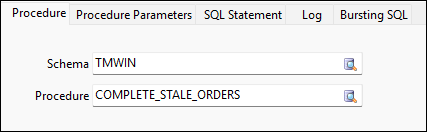

When enabled, the new Dawg can update all stale orders to the STALE status code. This removes them from the dispatching applications to improve performance.
An order is considered stale if:
-
The bill is not in a completed or cancelled status.
-
The bill has not been modified in the last 60 days.
-
The pickup or delivery time is not within 48 hours or blank.
Fixed query logic when assigning drivers to trips (TM-187777)
A query logic error was causing slow performance and incorrect results when assigning drivers to trips in several applications.
This query logic error has been fixed. This fix restores correct filtering and improves response times for Special Events-related workflows.
Blank To Date field now permitted (TM-188114)
In Dispatch and Driver Call In, the To Date field can now be left blank for expiry-only special events.
Enhanced the Add FB Unloading leg rule (TM-188206)
The Spotting status code has an Additional Rules option called Add FB Unloading Leg. This option has been enhanced to handle spotting trips at intermediate terminals.
When this option is set to True, the freight bill’s status is Spotting and an unloading leg for the bill is added.
When this option is set to False, the freight bill is docked without adding an unloading leg.
ConnectedDock
Added ability to define the trailer being loaded in ConnectedDock (TM-174036)
You can now define which trailer is being loaded in ConnectedDock when a trip has multiple loadable trailers.
-
If freight is already planned to a specific trailer, scanning the door loads to that planned trailer. After the first item is loaded this way, the rest of the freight on that bill stays on that trailer. If you need to split across trailers, that still requires splitting the freight bill in TruckMate. If you need the other trailer instead, scanning that trailer’s code on the first item sends the load to that trailer. Following items on that bill follow the same trailer.
-
If freight is not planned to a trailer, you can scan any trailer code assigned to the trip. The first choice locks that bill to that trailer for the rest of the loads.
-
If you use the door (or the usual load action) on the first item when nothing is pre-assigned, you are asked to pick which trailer you are loading. That prompt appears only for the first item. After the first time, the rest goes to the same trailer.
Updated /dock/scale endpoint to match Trimble standards (TM-184475)
The ConnectedDock API’s /dock/scale endpoint now aligns with Trimble standards.
Previously, certain workflows that were showing a 500 error should have been showing a 400 error when the workflow was attempted.
Now, a 400 error will show when an action is taken and:
-
There is no scale association.
-
Scale integration is not enabled.