2026 Releases
Last updated: June 11, 2026
Version 26.5.2
Release Date: June 11, 2026
Enhancements
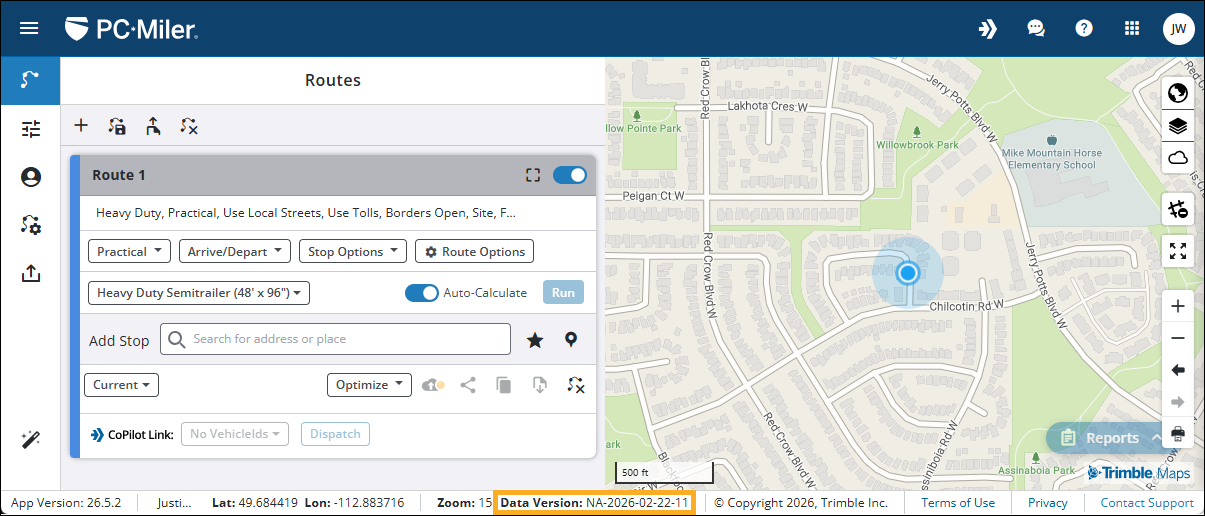
In order to provide better clarity for users, you can now view your current PC*Miler data version from anywhere within the application. The current data version is displayed within the application footer and is visible on all pages. This enhancement is intended to provide better clarity in support situations, and provide CoPilot Link users with the ability to confirm which data version was used when cross-referencing routes in CoPilot and RouteReporter.
Bug fixes and other improvements
-
Fixed an issue where the font and size of text was not readable when trying to print reports using the Print Report function.
-
Fixed an issue where the map scale would not update to show metric units after changing the units of measure in Application Settings.
-
Fixed an issue with the routes pane where saved routes displaying the Shared tag would cause misalignment of the route card if the route name was too long. Saved routes with longer names now wrap behind the Shared tag to prevent misalignment.
-
EU users only - Fixed an issue with CoPilot Link when dispatching a route using a default profile. When dispatching a route to CoPilot with a default profile selected, an error message would appear stating the route could not be dispatched.
-
Minor UI improvements have been made throughout the application to improve overall consistency. These changes do not affect functionality, but users may notice slight visual changes to windows, dropdowns, and menus.
Additional notes
In response to user feedback regarding the introduction of proximity-based search results in version 26.5.1, a new FAQ has been added to our online help guide. The article provides clarity on how search results are ordered, and gives recommendations for users who prefer to disable proximity-based search results.
Version 26.5.1
Release Date: May 28, 2026
New Features
Share Saved Routes
PC*Miler Web’s new Shared Routes feature lets you share your saved routes with other users in your company directly within the application. This allows you to quickly share routes with other users without having to export and share route files manually.
When you share a route, it becomes visible to all users within your company via the new Saved & Shared Routes window. Shared routes are denoted by a Shared tag in the upper-right corner of the route card.
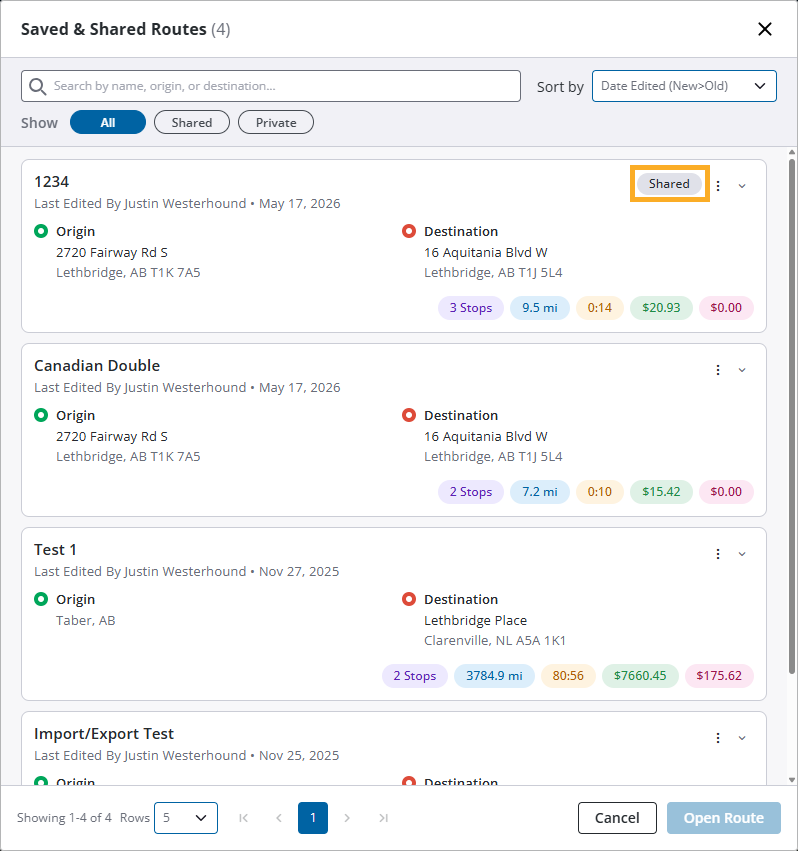
A shared route contains all route information, including stops, vehicle routing profile, and route options. This allows users to open the shared route and view all the same details that other users see. With a shared route, other users can use, edit, or delete the route as needed.
To learn more about how to manage and share saved routes, view our new help guide: Save, share, and manage routes.
| The option to export and share route files outside of the application remains available for users who prefer to share routes manually. |
CoPilot Link
PC*Miler Web’s CoPilot Link feature allows you to send routes directly to a mobile device with an active CoPilot license. With our latest update, users can now view a historical record of their dispatched routes from the last 30 days via the new CoPilot Dispatched Trips pane. Additionally, users with an active RouteReporter license can now access detailed trip information through Trimble’s RouteReporter program. These new features are intended to provide users with the ability to review their dispatched routes, and provide more detailed information after the route has been dispatched from PC*Miler to ensure compliance.
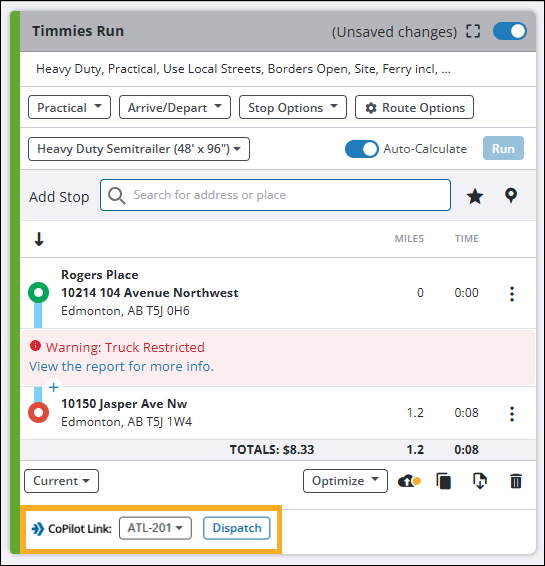
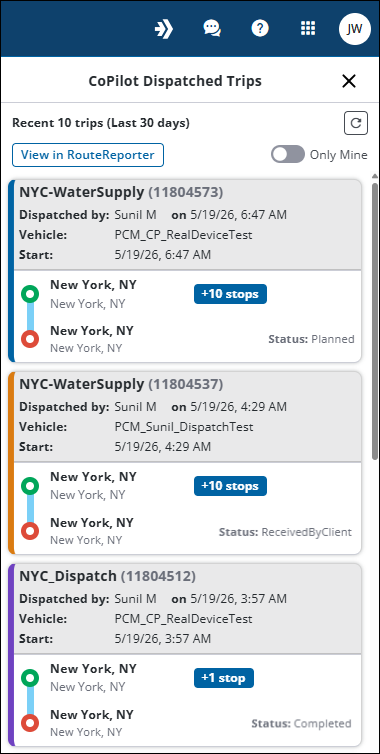
CoPilot Link is available for all PC*Miler enterprise accounts that have at least one active CoPilot license. There is no additional subscription cost for eligible accounts to use the basic features of CoPilot Link. However, features such as viewing dispatched routes in RouteReporter also require an active RouteReporter license.
For more information on setting up and using CoPilot Link, view our new CoPilot Link online help guide.
Enhancements
Saved & Shared Routes window
Numerous improvements have been made to the Saved Routes list. This new list is now called the Saved & Shared Routes window and combines all saved routes and shared routes into one location. This allows you to view all your routes in one place and easily identify which routes are shared with, or by, other users within your company.
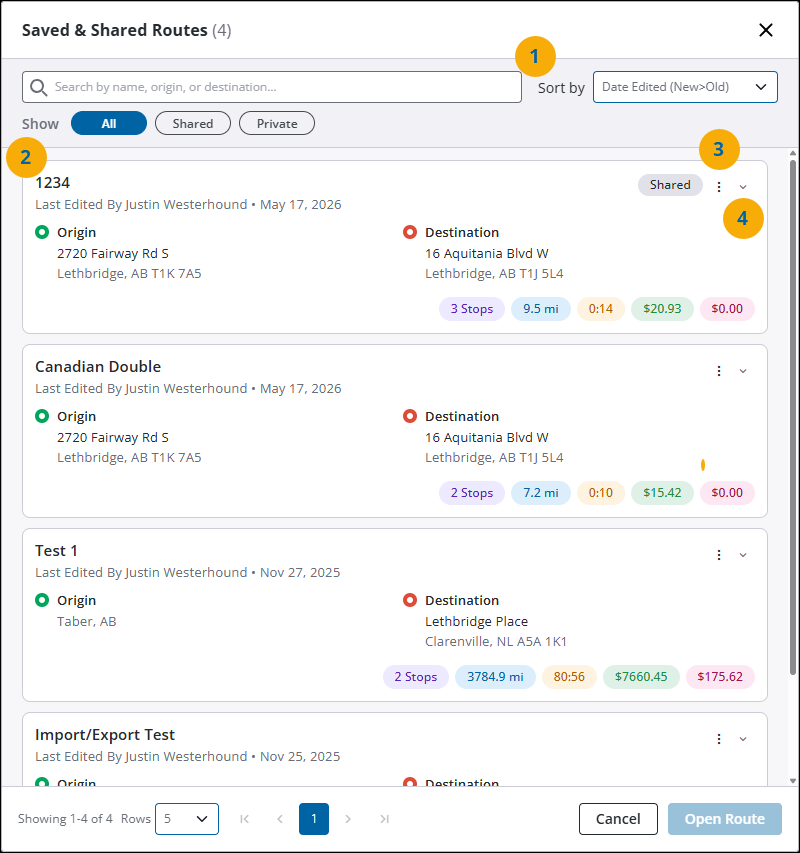
From the Saved & Shared Routes window you can:
-
Find a specific route by using the search and filter options:
-
Use the search field if you know the name of the route you want to load.
-
Use the Sort By dropdown to sort routes alphabetically, or by date edited.
-
Use the Show filters to display routes based on their status.
-
All - Displays all routes.
-
Shared - Displays routes that you have shared, and all routes shared by other users within your company.
-
Private - Displays routes that you have saved but are not shared with other users.
-
-
-
View route details for each route in the list. Each route card includes the route name and administrative details, origin and destination, and basic route details such as distance, time, and costs. If the route is shared, the route card also displays a Shared tag.
-
View the edit history or delete a route that is no longer needed via the Options menu.
-
View full stop details for each route by selecting the Expand icon.
Full details on the new Saved & Shared Routes window can be found in the Save, share, and manage routes help guide.
Remove or delete routes
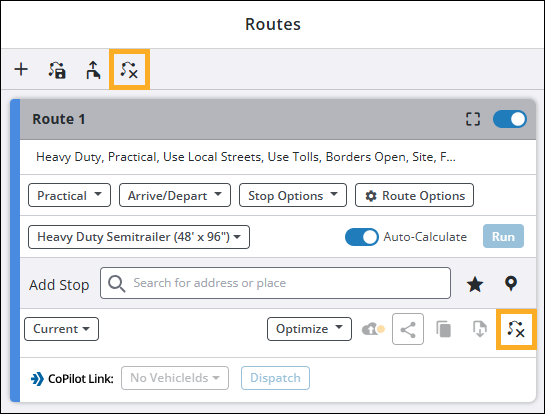
To provide better clarity with regards to route management, the Delete All Routes and Delete Route options in the Routes window have been renamed to Close All Routes and Close Route respectively. This change is intended to avoid confusion between removing open routes from your routes list and permanently deleting a route from the Saved & Shared Routes window.
Search based on current location
The search bar in the Routes pane now returns search results in order of proximity to your current location, if known. This change is intended to improve the relevance of search results when searching for locations near you. To disable this feature, you can turn off location services in your browser settings. When location services are disabled, search results will no longer be ordered by proximity.
Bug fixes and other improvements
-
Fixed a backend issue where discrepancies in how location information was processed between PC*Miler Web generated routes and QuickBatch uploads could result in distance and travel time calculations not matching between a route generated in the Routes pane, and the same route being generated using QuickBatch.
-
Addressed multiple issues with the Vehicle Routing Profile tab for EU Users:
-
Fixed an issue where the Save & Continue button in the New Vehicle Routing Profile window would not trigger the save action when selecting the RV routing profile template.
-
Fixed an issue where the Save & Continue button in the New Vehicle Routing Profile window would become stuck in a loading state when changing the routing profile template from RV or Heavy Duty to Auto.
-
-
Fixed an issue with route card notification banners where if Highway Only was enabled in the route options, the notification banner would not close after selecting the Close icon for the banner.
-
Fixed an issue with the Account Settings tab for non-enterprise customers where making billing changes such as increasing or decreasing the number of licenses would not enable the Update Billing button unless the credit card information was also edited. Now, the Update Billing button is enabled after making changes, even if no edits are made to the credit card information.
Version 26.4.2
Release Date: April 30, 2026
Bug fixes and other improvements
-
QuickBatch improvements:
-
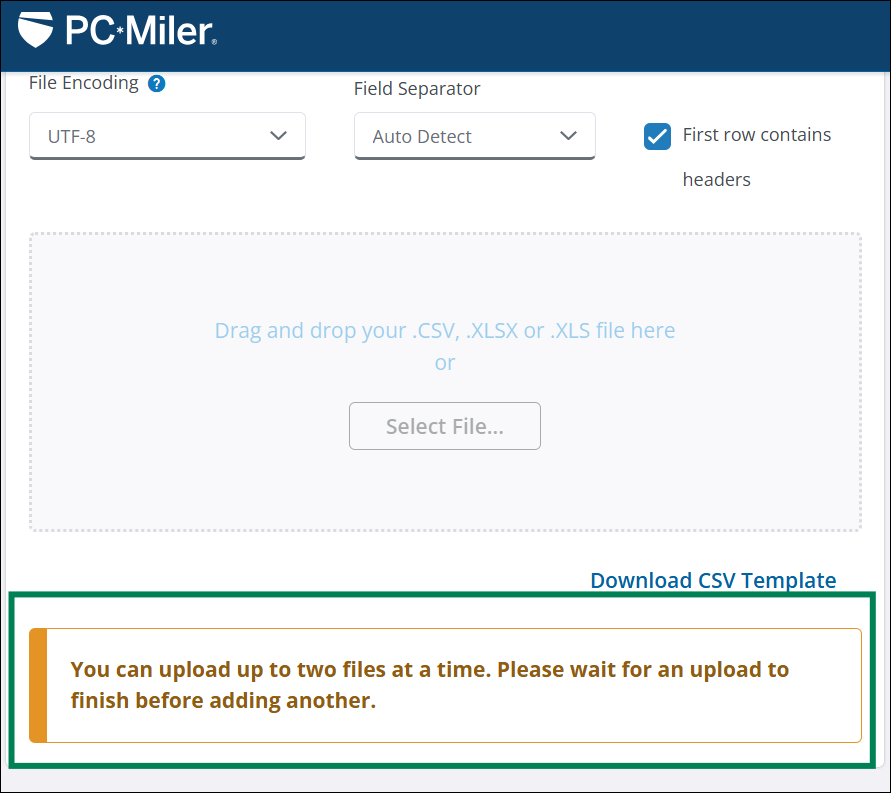
Introduced a concurrent processing limit for QuickBatch file uploads. A maximum of 2 files may be processed at the same time. If additional file uploads are attempted, a notification appears stating the file cannot be uploaded until one of the current files has finished processing. This change aims to improve overall system performance and stability with respect to QuickBatch processing times.
-
UTF-8 is now set as the default file encoding method. This change is set to reduce the number of origin/destination processing errors, especially for users uploading files containing addresses with special characters.
-
Fixed an issue where users would not receive a notification email after file processing had completed.
-
Improved QuickBatch processing logic for Round Trip feature.
-
-
Fixed an issue where units of measure displayed on the map would not update after changing units to Metric. Map units now reflect whichever unit of measure is selected within Application Settings.
-
Fixed an issue where stop location data could be altered after generating a route with Current initially selected, then choosing a different PC*Miler data version. This change would result in the updated route not including the correct stop locations. Stop information is now retained when changing between current and historical data versions.
-
PC*Miler Web has received a visual UI update to aid in better overall compatibility with unique viewing formats such as large format screens and improved dark mode support. Users may notice minor appearance changes to windows, menus, and dropdowns, however, overall functionality remains the same.
-
Fixed an issue where new users would not receive a registration email after signing up for a PC*Miler Web Trial or Premium account.
Version 26.2.4
Release Date: February 26, 2026
Enhancements
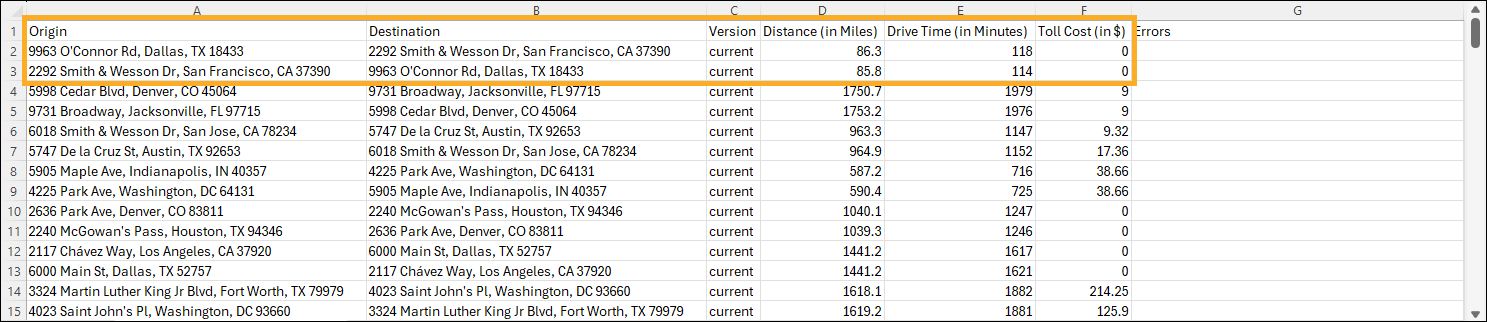
New enhancements for QuickBatch are now live. With this update, you can now include round trip calculations for your origin/destination pairs when uploading a data file. For a complete guide to using QuickBatch, view our QuickBatch help guide.
To enable round trip calculations:
In the Calculate During Upload pane, select the Round Trip toggle to include round trip calculations for each origin/destination pair in your upload file.
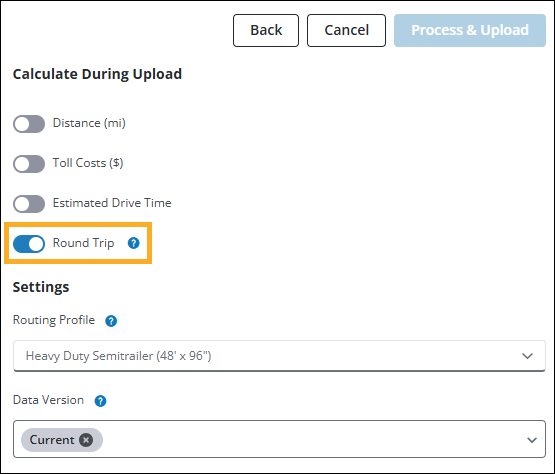
With the round trip option enabled, your output file includes additional rows for round trip calculation of each origin/destination pair. (Select image to enlarge)
Bug fixes and other improvements
-
Fixed an issue where the map would zoom into your current location multiple times before correctly centering on a selected route. This issue occurred when switching from a different browser tab back to an active PC*Miler Web session with location services enabled.
-
Fixed an issue where invalid route warnings could appear when viewing the QuickBatch window within PC*Miler.
-
Fixed an issue where routes would reload indefinitely after generating an invalid route and refreshing the browser window. Routes only require loading on initial route generation, existing routes now appear immediately after refreshing the browser window.
Version 26.1.2
Release Date: January 29, 2026
Enhancements
New enhancements for QuickBatch are now live. This update includes customer requested feature improvements and multiple bug fixes. For a complete guide to using QuickBatch, view our QuickBatch help guide.
Multi-Version Processing
-
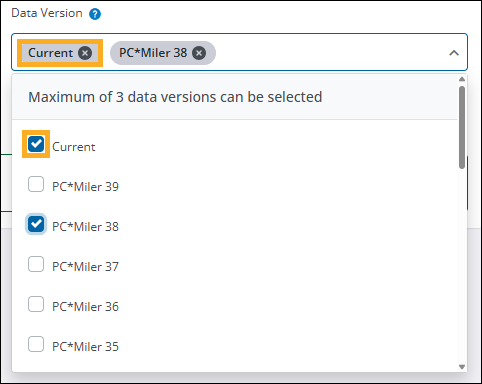
You can now select multiple PC*Miler data versions when uploading a file for processing. In the Calculate During Upload pane, select the Data Version dropdown and choose which data versions you would like to compare. Up to 3 different versions can be selected at a time.
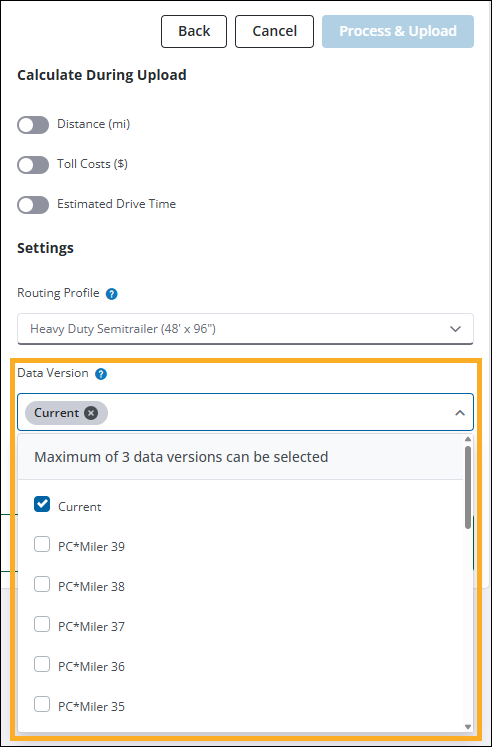
By default, Current is always selected. You can remove a version by selecting X next to the specific version you want to remove, or unchecking it from the dropdown list.
-
In relation to multi-version processing, the selected data versions are now stated in the notification email and are also listed in the third column of the output file.
-
Your previously selected file settings are now retained for future file uploads. This enhancement aims to increase efficiency and reduce errors in selecting settings when uploading multiple files for processing.
Bug Fixes and other improvements
-
QuickBatch bug fixes:
-
Fixed an issue where the same file could be submitted for processing multiple times in succession due to the Process and Upload button remaining in an enabled state after the initial upload. The button is now greyed out and reads Processing… after being selected, preventing multiple submissions of the same file.
-
Fixed an issue where the Process and Upload button would be incorrectly enabled after switching to a different PC*Miler tab and returning to QuickBatch.
-
Addressed an issue where uploaded files would not process due to the file name containing too many characters. If a file is uploaded and the file name contains more than 60 characters, a notification is now displayed stating that the file cannot be uploaded.
-
Updated download link in QuickBatch notification email. The link now directs to the QuickBatch tab and automatically triggers the file download process.
-
-
Fixed an issue where new routes would get stuck in a loading state after running the route and then editing Street Adherence settings in the Route Options pane.
-
Fixed an issue where the Reports pane would not load if PC*Miler Web was launched using the Applications menu from within another Trimble Maps product.
-
Fixed issues regarding exported reports when selecting .CSV as the file type. This fix addresses formatting issues and missing stop names for intermediate stops.