Purchase orders (POs)
A purchase order (PO) is a commercial document and first official offer issued by a buyer to a seller, indicating types, quantities, and agreed prices for products or services. It is used to control the purchasing of products and services from external suppliers. The PO feeds the inventory control process in the system.
The purchase order pages allow you to view, create, receive, and complete purchase orders. These pages are:
Purchase order workflow
When you create a purchase order, you enter information in progressive phases. You can add purchase information as needed.
This illustration shows the purchase order workflow.
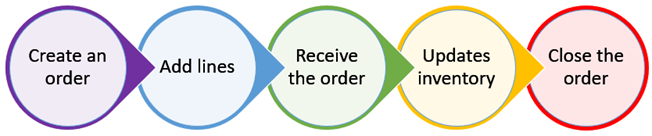
This table identifies the different phases of creating a purchase order.
| Phase | Description |
|---|---|
Create a purchase order |
Create a repair order and enter information in the Purchase Order pane. |
Add lines |
Add Lines as needed.
You are not required to add lines in any specific order. |
Receive the purchase order |
Receive line items on the purchase order and update receipts. |
Update inventory |
When you receive part, freight, and tax lines, you may update the inventory. |
Close the purchase order |
Close the order when all receipts are closed. |
For step-by-step instructions on how to create a purchase order, see Create a Purchase Order.
What are the different types of purchase orders?
There are four types of purchase orders:
-
Blanket: You use a blanket purchase order when a purchase order will have multiple receipts and invoices or needs to remain open during a specified time, such as a month or week.
Note: Items entered on a blanket PO are automatically received into inventory when you save the PO.
-
Credit: You use a credit purchase order to credit inventory when returning parts to a vendor for credit.
-
Standard: A standard purchase order is your daily purchase order. You use it to control the purchasing of products and services from external suppliers. A standard PO is used to place orders with a vendor will be delivered later.
-
Vendor RO: A vendor repair order purchase order (VROPO) is created through the vendor repair order process. The VROPO is the purchase side of the vendor repair order (VRO). This PO type updates automatically as you add or remove vendor line items to the vendor repair order.
Note: The VROPO can only be created from the vendor repair order process.