TMT Fleet Maintenance V.2025.3.2 Release Notes
This document contains information on the latest version, including:
-
Enhancements (new or updated features)
-
Resolved issues (application improvements)
Issues are presented in this order:
-
Enhancement or Resolution
-
Feature set or module
-
Menu path
-
Issue number
To go directly to the section you’re interested in, use the page contents links on the right side of the page.
General information
All information in this section applies to all 2025 releases except where noted.
Warnings
PLEASE READ BEFORE UPGRADING
Important Product Notice for 2025.3 Release: Security Update
A security update has been made to TMT Web, and we highly recommend that all customer-hosted On-Premise customers upgrade to 2025.2, or the latest patch version for your TMT Web product, which can be found on the Client Center. If you have any questions please contact Trimble Transportation Support.
Important Product Notice for 2025.2 Release: TMW Suite Integration Options
With the release of TMT Version 2025.2, we have added two new Integration Options for the TMWSuite Integration. These new options will let you update the Unit Subdivision and Unit Fleet values from TMWSuite to the TMT Unit Master record. Previously, you could not access these options; they could only be enabled by a database administrator.
Before upgrading to TMT Version 2025.2, TMT customers using the TMWSuite Interface should review the information about these new Integration Options included in this document. Then they should decide if they want the integration to act the same way it did in previous versions when updating the TMT Unit User fields with the TMWSuite Subdivision and Fleet Codes.
For more information, see the release note information for TMT-324606.
Important Product Notice for 2025.2 Release: Comdata Integration
If you use the Comdata integration, there is an important Comdata security update that may require action.
If you are currently using COMDATA for VCARDS and/or ECHECK, Comdata will begin enforcing a new password strategy. The next planned update by COMDATA will occur on July 31, 2025. This will result in your Comdata integration with TMT ceasing to function if you are on a version of TMT older than 2024.1.
All versions of TMT at 2024.1 and newer have the security compliance patch and meet the requirements of the planned password changes to comply with the Comdata upgrade on July 31, 2025. You should contact Comdata to request the new, longer password.
If you need further assistance, please contact Trimble Transportation Support.
Important Product Notice for 2025.1.3 Release
A security update has been made to TMT Web, and we highly recommend that all customer-hosted On-Premise customers upgrade to 2025.1.3, or the latest patch version for your TMT Web product. If your version is not listed, to ensure you are protected from this vulnerability you must upgrade to a supported version as soon as possible and apply the patch. If you have any questions, please contact Trimble Transportation Support.
-
TMT Web Version 2019.4 (2019.4.8.132)
-
TMT Web Version 2022.2 (2022.2.2.525)
-
TMT Web Version 2022.3 (2022.3.6.555)
-
TMT Web Version 2023.1 (2023.1.2.557)
-
TMT Web Version 2023.2 (2023.2.3.821)
-
TMT Web Version 2023.3 (2023.3.3.695)
-
TMT Web Version 2024.1 (2024.1.3.704)
-
TMT Web Version 2024.2 (2024.2.3.1001)
TMT SOAP APIs
A security update has been made to the TMT SOAP APIs, and we highly recommend upgrading to TMT 2023.3.3 or later.
If you are a TMT and TruckMate client, the aforementioned APIs impact this integration, so please take note of the following:
-
If you plan to upgrade TMT to 2023.3.3 or higher you may upgrade both TMT and TruckMate at the same time, or upgrade TruckMate first, followed by TMT.
-
Please contact TMT support for version compatibility questions.
If you are using TTP on premise, and you chose not to upgrade to V.2022.2 or higher, you can still use the current TTP URL, https://tmt-ttp.trimble-transportation.com/.
Client Server
You will not be able to use TMT Client Server (Delphi) if you upgrade to 2020.1 or later. DO NOT upgrade unless you are ready to go to TMT Web Only.
Please note that our 2025.3.2 release does not include an update to our Client Server (Delphi) product. As announced in October 2019, our 2019.4 release was our final version with enhancements to the Client Server version of the system. Per our October 2019 notice, this release (2025.3.2) and all future TMT releases will only include updates to the Web version of our software.
The TMT Client Server (Delphi) version of the system cannot be used with the new Web version of TMT (V.2025.1). By taking this upgrade (2025.3) to Web, customers will need to move exclusively to the Web version of TMT only. Do not upgrade your production system until your team is able to make a complete move to TMT Web only.
Prior to beginning this installation, please review the following details. We highly recommend reviewing system hardware requirements as they are different for this new, more advanced release. In addition, we recommend installing the system on a test server and using the resources noted below to prepare your staff to work with our new user interface.
For more information from your Customer Support Team, see the TMT Migration Planning Guide.
Please contact your Customer Support Representative before you upgrade to 2025.3.2.
-
Phone: 800-663-0626 option 5
-
Email: [email protected]
AMSLIC Database: READ BEFORE UPGRADING
TMT Fleet Maintenance/Service Center V.2022.2 and above uses a new, merged database. Before upgrading, you will need to run the "Installer_Migration_Script" to merge your TMWAMS main database with your AMSLIC framework database. Please note that if you are coming from an older Client Server version, you will need to be on at least version 2020.1 before running the merge script. Once the database has been merged, you can proceed with the upgrade as normal.
-
Version 2025.3.2: Only includes TMT for Web. It does not include TMT for Client Server.
-
Client Server upgrades are no longer included or supported beginning with Version 2020.1. A Client.exe file is no longer included.
-
Hardware Requirements: Make sure you have the correct hardware required to support TMT for Web V.2025.3.2 before you upgrade. Download the TMT Fleet Maintenance and Client Server Hardware Specifications document.
-
Create a migration plan: Create an SOP, create a training plan, and install V.2025.1 in a test environment.
-
Train your staff: Use the "Free Choice Training Menu" by accessing the TMT Migration eLearning course to become familiar with TMT for Web (requires a login for the Trimble Client Center). We are calling it a "free choice menu" since the topics may be viewed in any order you choose. This is an interactive eLearning course that allows you to progress at your own pace as opposed to a non-interactive video. We hope you find the interactive content useful and engaging!
Telerik Vulnerability
Customers who are on versions of TMT Web prior to 2022.1 may be exposed to a vulnerability documented by one of our third-party software vendors (Telerik). Guidance varies depending on the installed TMT Web version (see below). For information directly from Telerik, please use this xref:
-
2022.1 through 2025.3.2
Uses an upgraded Telerik version that has patched the vulnerability (no changes needed). -
2019.4
A service pack is available which includes patched Telerik DLLs. This can be located under the 2019.4 version downloads. -
2019.2
Remediation possible with web.config changes in this version and higher (2019.2-2021.2.X). -
Prior to 2019.2:
-
Remediation is not possible with web.config changes. You must upgrade.
-
For Delphi/Web hybrid customers, see 2019.4 section above. For all others, we would suggest you upgrade to the latest version of TMT Web.
-
Telerik Vulnerability Remediation
Please refer to this link for detailed steps on patching this vulnerability:
This involves web.config changes, and it can be done without taking an upgrade. However, we strongly encourage you to upgrade to a later version of TMT Web for the greatest level of mitigation.
Changes to hardware requirements
TMT V.2025.3 has new SQL Server requirements. You must be using SQL Server 2019 or later to use TMT V.2025.3.
For SQL Server 2019, the recommended compatibility mode is 150.
There are two files from Microsoft that are required for this version:
-
SQL Server 2019 CLR Types
-
SQL Server 2019 Shared Management Objects
TMT V.2022.1 through TMT V.2025.3.2 have SQL Server 2016 as a requirement.
For SQL Server 2016, the minimum compatibility mode is 130. TMT will also support modes 140 and 150.
There are two files from Microsoft that are required for this version:
-
SQL Server 2016 CLR Types
-
SQL Server 2016 Shared Management Objects
Review the latest Hardware Requirements documentation prior to upgrading.
You must download and run both files via the following links before upgrading to TMT Web V.2022.1 or higher:
-
SQL Server 2016 SP2 feature pack
https://www.microsoft.com/en-us/download/details.aspx?ID=56833 -
SQL Server 2016 SP3 feature pack
https://www.microsoft.com/en-us/download/details.aspx?ID=103444
|
You must not delete the 2008R2 CLR/SMO SQL Server components from any TMT Web environment when installing or upgrading. The installer is still using these components at this time. |
Windows Server and SQL Server upgrades are included in TMT Web software as a service (TMT Web SaaS). For information about upgrading to TMT Web SaaS, contact Dawn Siegel at [email protected]. If you have technical questions, contact TMT Support.
Changes to TTP
-
Trimble will upgrade TTP to V.2025.3.2 on Sunday, December 14, 2025. Users should clear their cache when logging back in following the update, please refer to the Security Administrator guide for instructions. The production URL will stay the same: https://tmt-ttp.trimble-transportation.com/.
-
If you are a customer that self-hosts the TMT Web Application, and you choose not to upgrade to V.2022.1 or higher, you can still use the same TTP URL as mentioned above.
-
Interactive Workstation (IWS) will no longer be supported in V.2022.3 and later due to the sunsetting of Internet Explorer and Silverlight.
-
If you upgrade to V.2022.3 or later, note that any IWS out of browser shortcuts that have been installed need to be deleted and will not be supported.
-
You can still call our support team for assistance on IWS with V2022.2 or lower, but IWS will no longer be included with TMT V.2022.3 or later. You will still have access to IWS in V.2022.2 if you maintain an existing instance of Silverlight and use Microsoft Edge in IE Compatibility Mode.
-
|
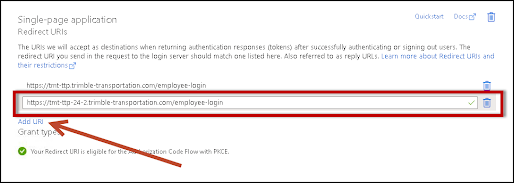
If you use Single Sign On (SSO) for TTP and you are on TMT Version 2025.2, please add https://tmt-ttp-25-2.trimble-transportation.com/login in your Azure Portal as a "Redirect URL". For more information relating to SSO for TTP, refer to the Security Administrator Guide.
|
Enhancements
Integration Tool Kit
Setup > Tool Kit > Integration Tool Kit REST
-
TMT-329035
Fixed the behavior so that records load quickly without any timeouts. -
TMT-329055
Changed the POST /Integration/Mobile/DVIR API to require a valid value and only allow a value of Y or N. If any other value is passed, (including BLANK or NULL), the API will display a 400 Response with the message: "Invalid value for 'SafeToDrive'. Allowed values are 'Y' or 'N'."
Resolved issues
Accounting
Activities > Accounting > Accounting
-
TMT-327120
Fixed an issue where incorrect zero-dollar accounting entries appeared in purchase order accounting records when closing receipts containing backordered items. This fix ensures that accounting records display only accurate debit and credit entries, providing cleaner financial reports and improved accuracy for users managing purchase orders. -
TMT-328930
We’ve resolved an issue where subrules with the same account as the base rule were not being applied correctly during order disbursement. This update ensures that the system now accurately uses the specified accounting structures for all orders, improving financial precision.
Database
-
TMT-329217
The TMWAMSEXT_VENDORS_CREATE stored procedure should not return an error on column TAXEXMTVRO in TAXGROUP database table.
Masters
Masters > Company
-
TMT-329040
Fixed an issue where the Company ID field could be changed from the default "TMT" value in new databases, which caused errors when processing orders. The field now remains locked to "TMT" when multi-company accounting is disabled, preventing these errors and ensuring smooth order processing.
Repair Orders
Orders > Repair Order
-
TMT-328907
Resolved an issue in Repair Orders where the user-defined repair reason code would sometimes not display. This fix ensures the code is always visible and corrects the tab order in the Add and Edit Section popups for consistent use. -
TMT-329104
Fixed an issue that prevented repair orders from closing when they contained parts with two or more meter types in warranty coverage. Customers can now complete repair orders without errors, and warranty utilization calculations are accurate. -
TMT-329122
Closing Repair Orders is now more reliable, resolving the error "An error occurred while updating the entries. Please see inner exception for details" caused by an incorrect Price Table ID update.
Trimble Technician Portal
-
TMT-323046
Corrected the application to use the Assign Employee without Job Code option properly. When the Assign Employee without Job Code option is set to YES, job codes are not mandatory on section creation for the shop. When the option is set to NO, job codes are mandatory to create a section for a shop. This option is available under both Application and Shop Options.