TruckMate 2025.4 New Features: Back Office
Released: January 16, 2026
Last updated: January 16, 2026
General
Financial API updates (TM-180264)
The Finance API has had many endpoints added. The tables affected can be grouped based on functionality.
Accounts Payable (APNE.EXE)
There is a new, centralized Delphi library module that this application uses to insert, update, and delete entries in these tables. This module is shared by ART to keep the tables consistent.
Tables include:
-
TB:AP_BILL
-
TB:AP_BILL_EXP
-
TB:AP_BILL_DRV
-
TB:AP_ISTA
Endpoints include:
-
POST, GET /finance/apInvoices
-
POST, GET /finance/apInvoices/{apInvoiceId}/expenses
-
POST, GET /finance/apInvoices/{apInvoiceId}/apDriverDeductions
-
POST, GET /finance/apInvoices/{apInvoiceId}/ista
-
POST, PUT, GET, DELETE /finance/apInvoices/{apInvoiceId}
-
PUT, GET, DELETE /finance/apInvoices/{apInvoiceId}/expenses/{expenseId}
-
PUT, GET, DELETE /finance/apInvoices/{apInvoiceId}/apDriverDeductions/{apDriverDeductionId}
-
PUT, GET, DELETE /finance/apInvoices/{apInvoiceId}/ista/{istaId}
Interliner Payables (IPIIPM.EXE)
The ability to audit one IP record was added. The main table is TB:ORDER_INTERLINER but TB:ACHARGE_INTERLINER and TB:ORDER_INTERLINER_ADDITION are also affected.
There is a new, centralized Delphi library file being used. It currently only supports changing status from Unaudited to Audited or vice versa.
For this endpoint there were only certain IPIIPM.EXE configuration options observed.
Endpoints include:
-
PUT /finance/interlinerPayables/{interlinerPayableId}
-
GET /finance/interlinerPayables
-
GET /finance/interlinerPayables/{interlinerPayableId}
GL Chart of Accounts (GLM.EXE)
There is a new, centralized Delphi library file shared with ART.EXE.
Tables include:
-
TB:GLACCOUNT
-
TB:GLSEGMENT
-
TB:GLACCOUNT_TYPE
Endpoints include:
-
POST, GET /finance/glAccounts
-
PUT, GET /finance/glAccounts/{glAccountId}
-
GET /finance/glAccountSegments
-
GET /finance/glAccountTypes
User Fields Data Endpoint (APNE.EXE, ARRCE.EXE, CHEQUE.EXE, GLM.EXE, PAYAUDIT.EXE)
The shared libraries of these applications were modified to expose the associated user fields.
Tables include:
-
TB:USERFIELDS
Two tables had 10 user fields added:
-
TB:AP_BILL
The AP Invoice Entry (APNE.EXE) application now has a User Fields tab. -
TB:DR_STMT_REPORT
A new read-only form has been added to the Pay Audit application. To access it, right-click in the Driver grid and select Pay Statement History from the shortcut menu.
Endpoints include:
-
PUT, GET /finance/userFieldsData
Added support for Minnesota Paid Family Leave (TM-185585, TM-186575)
The state of Minnesota has a Paid Family Leave (PFML) program that took effect on January 1st, 2026. To enable the calculations needed for US payroll taxes, changes have been made to the Company Profiles, Employee Data, and Payroll Configuration applications.
If you have Minnesota employees, there is some configuration you need to complete to calculate US payroll taxes properly.
Company Profiles
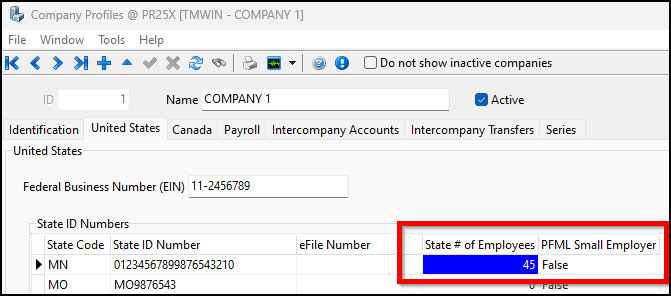
In Company Profiles, on the United States tab there are two new columns to populate:
-
State # of Employees
Enter how many employees you have in the state. -
PFML Small Employer
Indicates whether you are a PFML small employer. For Minnesota, set this to True if you have 30 or fewer employees in the state.
Employee Data
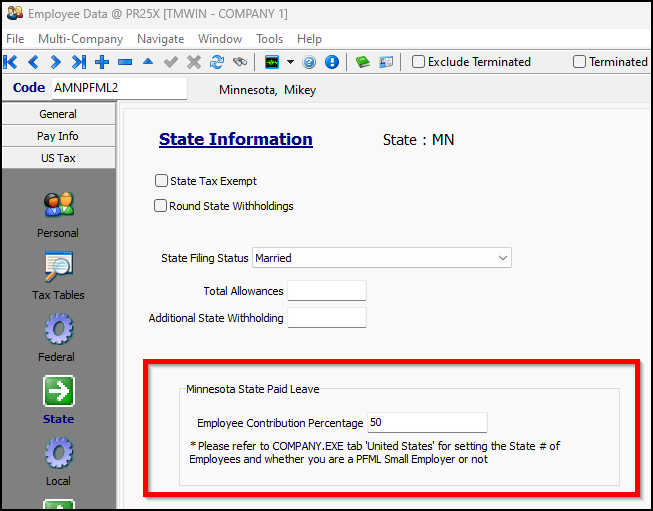
In the US Tax > State section of Employee Data, there is a new Minnesota State Paid Leave pane. Enter a value in the Employee Contribution Percentage field.
Payroll Configuration
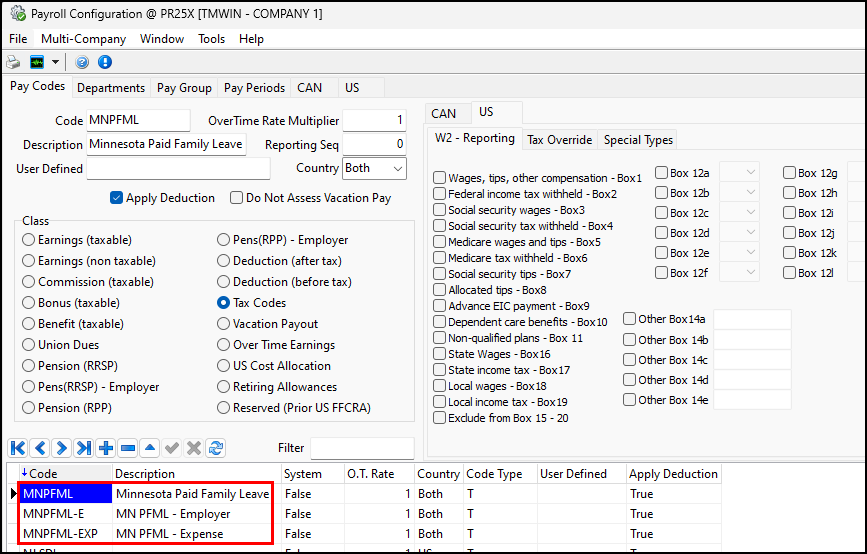
In Payroll Configuration, you need to set up three pay codes in Payroll Configuration: the main one used for the employee tax, and the other two for the employer’s portion and matching expense entry.
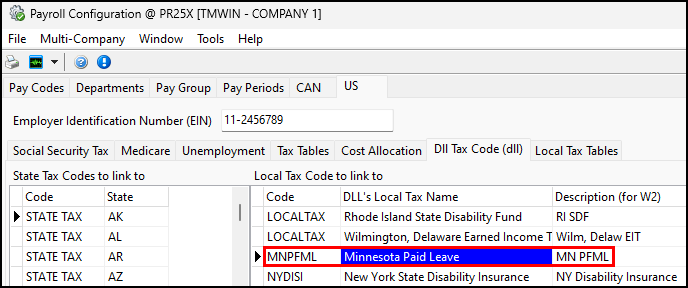
The US > Dll Tax Code (dll) tab has a new Minnesota Paid Leave option on the Local Tax Code to link to grid. This grid needs to have a Minnesota Paid Leave entry that is associated with a payroll code.
| TruckMate does not currently support IRS Revenue Ruling 2025-4. If your company pays for part of an employee’s contributions, it will not be included in their taxable benefits for payroll remuneration. |
Updated the Skid Dimensions form (TM-176997)
The old skid dimensions form has been deprecated. The related application configuration option (app config) CSERV.EXE - Use Old Skid Dimension Calculator has been removed.
The newer skid dimensions form has had features added. You can now specify for each skid:
-
What units of measurement it uses
-
Whether its dimensions should be converted to the same cube units as the Load Details record it is assigned to
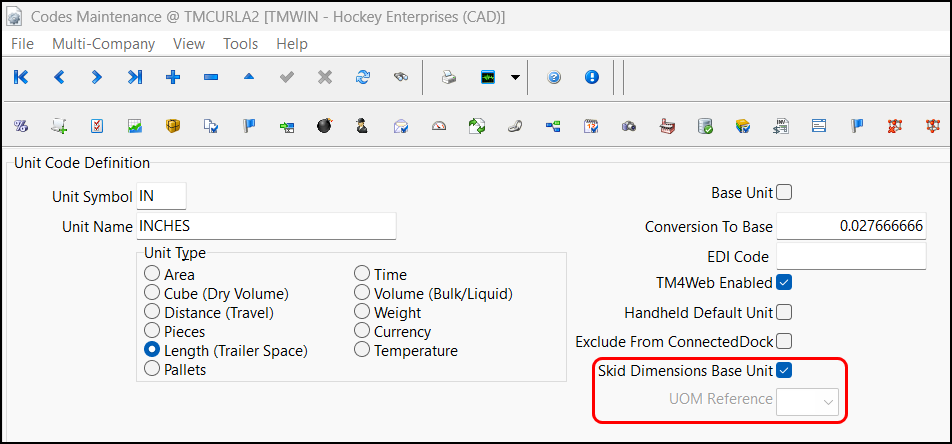
These are set by two new options on the Units tab in Codes Maintenance:
-
Skid Dimensions Base Unit
-
UOM Reference
As an example, here is a record on the Load Details grid that has three pieces and M3 (cubic meters) as its Cube Units value:

In the Skid Dimensions window, dimensions have been entered for three skids that each have one piece. These dimensions are in centimeters, meters, and feet, respectively.
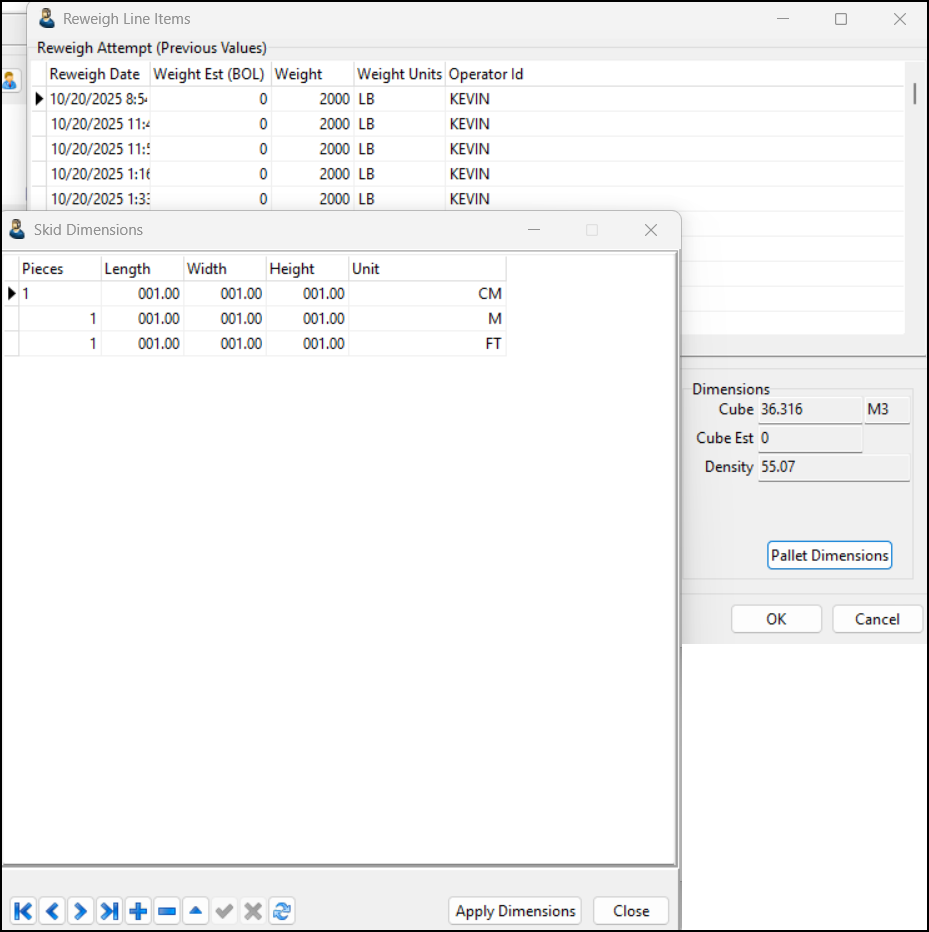
After selecting Apply Dimensions, the three skids are converted and summed to the record’s M3 Cube Units value.
The updated form can be accessed from both Customer Service and Multi Mode Dispatch.
Customer Service
Added pickup and delivery date hotkeys (TM-177219)
You can now use hotkeys to change the pickup and delivery dates of freight bills.
While viewing a freight bill, you can select any of these hotkeys:
-
F2
Changes the Pick Up By, Pick Up By End, Deliver By, Deliver By End, Pick Up Appt Made values to the current date. Selects both the pickup and the delivery Appt Made checkboxes. -
F3
Changes the Pick Up By and Pick Up By End values to the current date. Selects the pickup Appt Made checkbox. -
F4
Changes the Deliver By and Deliver By End values to the current date. Selects the delivery Appt Made checkbox.
| If the freight bill cannot be edited because it has been cancelled or interfaced, you will get an error message if you select any of these hotkeys. |
The date changes only take effect after you select Post 
Added ability to have barcode items roll up at freight bill level (TM-185088)
Support has been added for freight bill-level rollup for barcode item weight and cube thresholds. This method has improved rating accuracy over per-detail-line evaluation.
To support this feature, two application configuration options have been added:
-
CSERV.EXE - Barcode Item Threshold Calculation Method
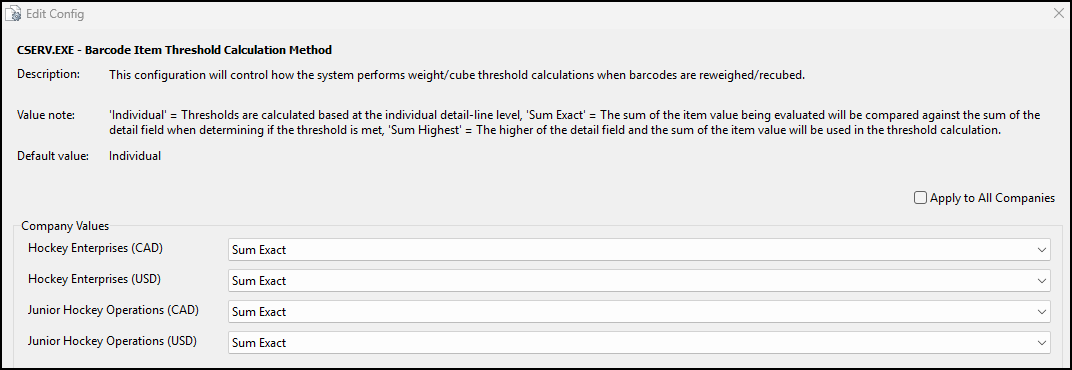
This config controls the barcode item threshold calculation method. The options are:
-
Individual
-
Sum Exact
-
Sum Highest
-
-
CSERV.EXE - Barcode Item Threshold Update Reference
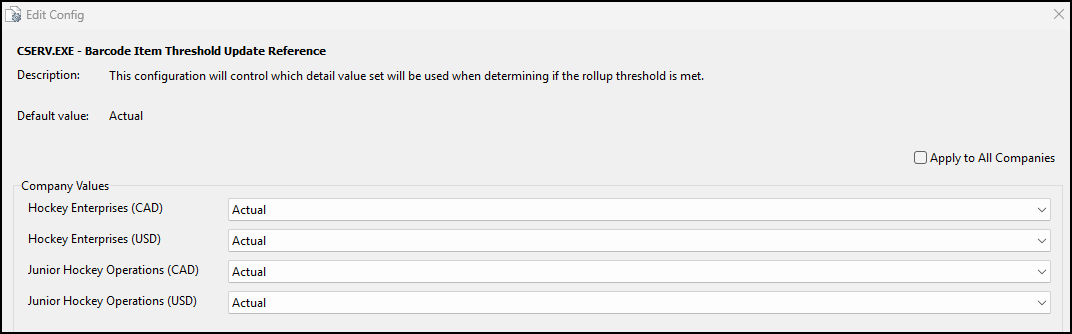
This config sets the comparison reference. The options are:
-
Actual
-
Estimate
-
Detail lines only update when the configured threshold is exceeded under the selected calculation method. These parameters apply to both Customer Service and ConnectedDock. It includes automatic unit conversion and supports higher-of logic when Sum Highest is selected.
| The item rollup thresholds set in LTL Service Level Maintenance or Codes Maintenance take precedence over the thresholds set in the Barcode Item Threshold Update Reference app config. |
Here are examples of how the system works based on the calculation method. In each example, the Weight on the Item Rollup Thresholds pane is set to 19.99 lb.
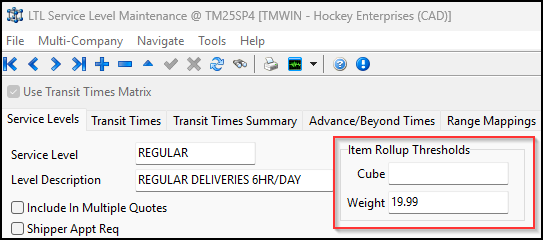
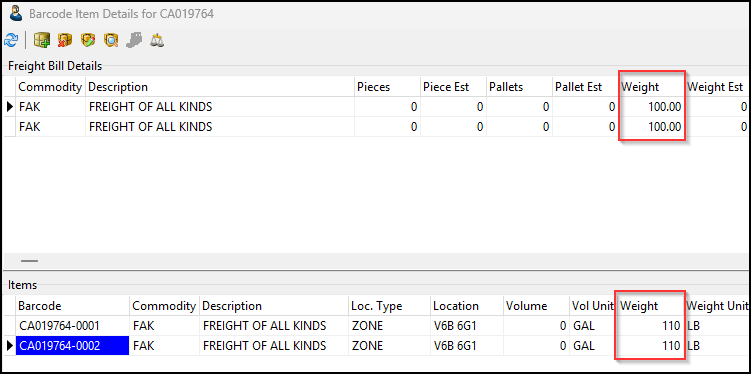
Individual example
Setup:
The Barcode Item Threshold Calculation Method app config is set to Individual.
Action:
Two detail lines (100 lb each) were created. A 110 lb barcode item weight was assigned to each.
Result:
The Weight value is not updated for either line. Each detail line’s variance was 10 lb. This falls below the 19.99 lb threshold.
Sum Exact example
Setup:
The Barcode Item Threshold Calculation Method app config is set to Sum Exact.
Action:
Two detail lines (100 lb each) were created. A 110 lb barcode item weight was assigned to each.
Result:
The Weight value is updated for both lines. The total variance between the two lines is 20 lb. Together, they exceed the 19.99 lb threshold.
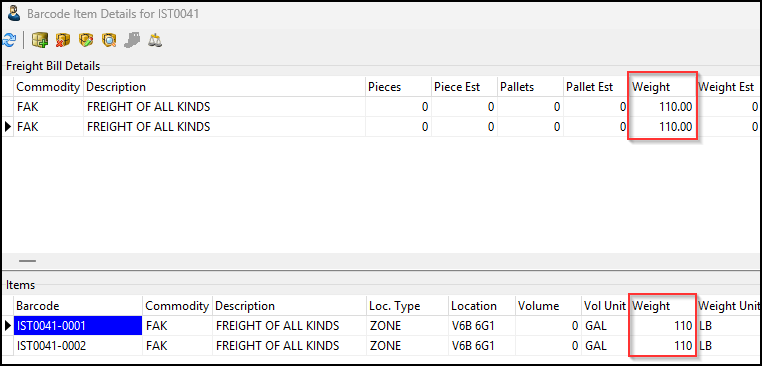
| If the item weight is not greater than the detail line’s weight, then that line is not updated even though the total variance exceeds the threshold. |
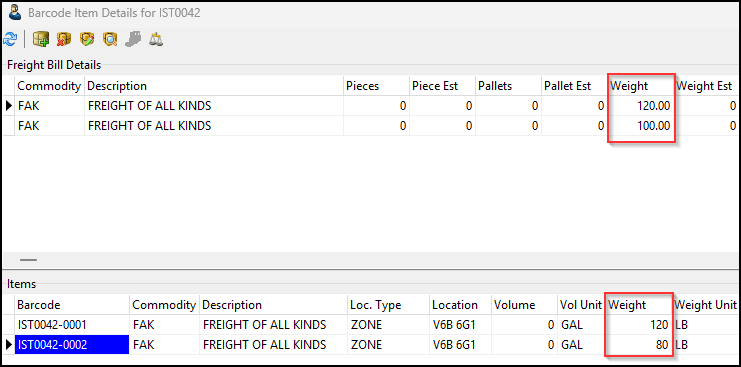
Sum Highest example
Setup:
The Barcode Item Threshold Calculation Method app config is set to Sum Highest.
Action:
Two detail lines (100 lb each) were created. A 120 lb barcode weight item weight was assigned to the first line. An 80 lb barcode item weight was assigned to the second line.
Result:
Only the 120 lb detail line’s Weight value is updated. The total variance between the highest sum and the detail line is 20 lb, which exceeds the 19.99 lb threshold. This triggers the update for the entire freight bill. However, since the 80lb barcode item weight is less than the second detail line’s weight (100 lb), the second detail line is not updated.
Grid Customizer
Added first cell default option (TM-185521)
A grid property option called Default First Cell has been added.
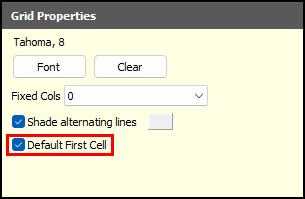
If this option is selected, when you select the Down arrow key, your cursor will move to the first column in the grid.
If you leave this option cleared, when you select the Down arrow key, your cursor stays in the same column.
This option is cleared by default.